
ChatGPT ads bill after delivery. How payment thresholds trigger card charges, why a temporary hold appears, the two budget types and what self serve accounts cannot cap.
On this page
- The short version
- Before anything can deliver
- How charging works
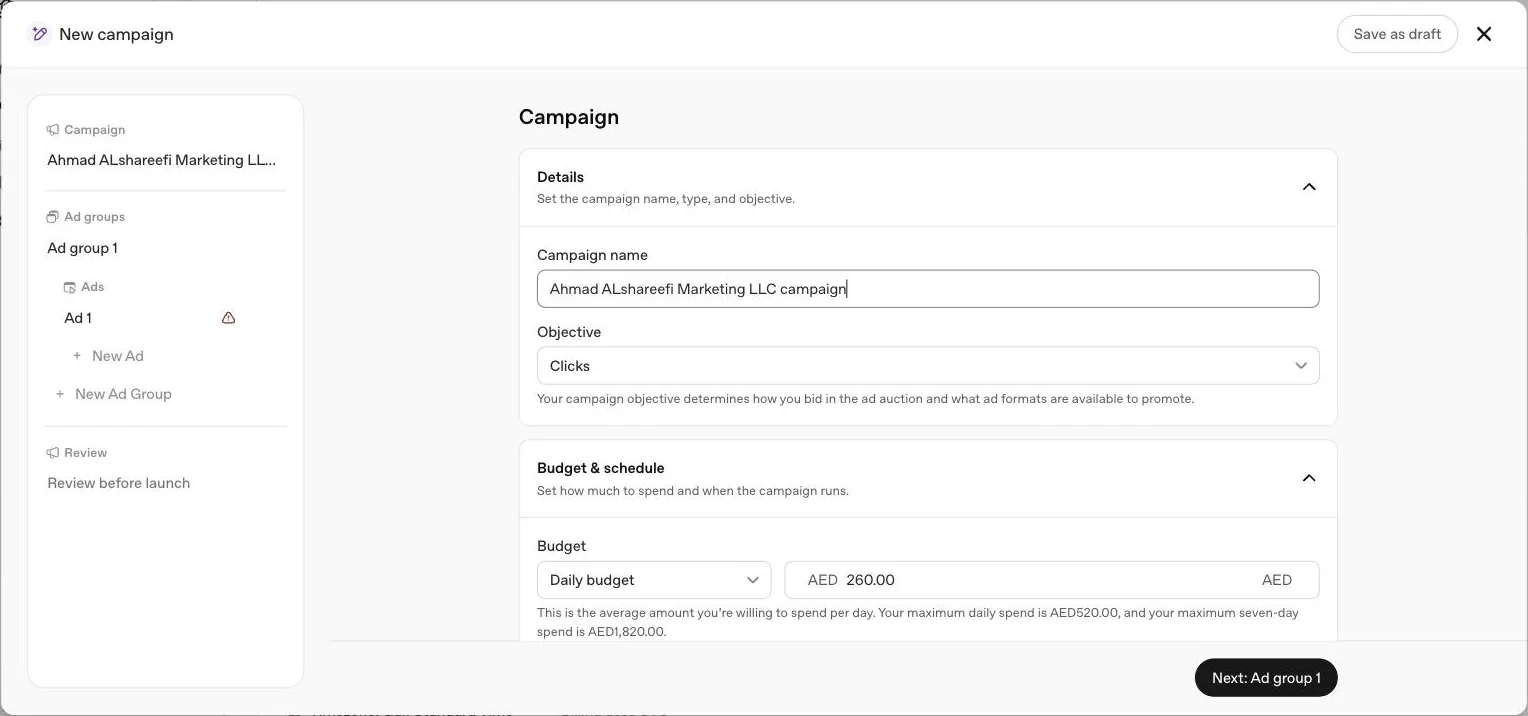
- The two budget types, and what they control
- What actually accrues spend
- Illustration: how a threshold ramps through a month
- What you cannot do on self serve
- When a payment fails
- Charges after you pause
- Changing billing details after setup
- Reading spend correctly
- Common billing mistakes we see
- Invoices and tax IDs
- UAE specifics
- Quick answers
The short version
You pay after delivery, by card, in steps. Spend builds up until it hits a threshold OpenAI assigns to your account, the card is charged, and the cycle repeats through the month. Whatever is left unpaid is charged at month end regardless. The only spending controls a self serve advertiser has are campaign budgets, not an account wide cap. That last point surprises most UAE finance teams the first time they look for one. For budget planning, see what ChatGPT ads cost in AED.
Before anything can deliver
Two items must be complete in Ads Manager before a campaign will serve a single impression.
Create a billing profile
Business name, business address and an invoice delivery email. This email receives invoices and billing communication, so use a monitored inbox, not a personal one.
Add a payment method
Card details and a billing address that matches the business entity the account was created for.
When you add a card, your bank may show a temporary authorisation hold, shown as the equivalent amount in your card's currency. OpenAI is explicit that this is not a completed charge. It releases automatically after verification, though your bank may keep it visible on your statement for 8 days or longer. The expected hold amount is shown on the setup page and again on the Ads Billing page inside Ads Manager, and OpenAI says Billing, then Activity lists each Authorization hold with its date, amount, currency and status, so you can check it before assuming something went wrong.
How charging works
| Event | What happens |
|---|---|
| Ads deliver | Spend accrues on the account as impressions or clicks are served |
| Unpaid spend hits the payment threshold | The saved card is charged and a receipt is emailed |
| Month ends with a balance | The balance is charged even if the threshold was not reached |
| Good payment history | OpenAI may raise the threshold automatically over time |
| A charge fails | OpenAI emails a notification; failed charges, disputes and chargebacks can pause progress toward a higher threshold |
OpenAI's own example uses a 25 US dollar threshold, roughly AED 92 at the fixed peg. New accounts typically start low. You cannot change the threshold yourself, and OpenAI states plainly that support will not change it on your behalf either. It moves up automatically, based on successful payment history and other factors OpenAI does not itemise. Under the current default, OpenAI says progression can occur after two separate successful invoice payments that each meet or exceed the qualifying threshold before tax; its US dollar example steps from 25 to 50 to 100 and then 200, which it says illustrates possible progression, not a guarantee. OpenAI also notes that applicable taxes can make the card charge exceed the payment threshold.
For a UAE finance team this means several small card charges in the first weeks instead of one clean monthly invoice. Tell accounts payable before the first campaign launches, use a card with room for repeated authorisations, and do not treat the payment threshold as a budget. It is a charge trigger, not a spending limit.
The two budget types, and what they control
| Budget type | How it behaves | What it does not do |
|---|---|---|
| Daily budget | An average over seven days. One day can bill up to twice the amount; seven days will not exceed seven times the amount | It is not a same day spending cap |
| Campaign total budget | A ceiling for the whole campaign, paced across the schedule using remaining budget and, where set, the end date | It does not guarantee even spend across the whole period |
You can change the budget amount at any time. You can also change a campaign total budget to a daily budget, but OpenAI says you cannot switch that campaign back to a campaign total budget; a daily budget campaign stays a daily budget campaign. The full mechanics of the seven day averaging and pacing algorithm are in our dedicated daily budgets and pacing guide, and how your bid strategy interacts with that budget is in the bidding strategies guide.
What actually accrues spend
Billing and Payment ties back to the objective you picked when you built the campaign, covered in full in our cost guide. The objective decides what event triggers spend against your threshold.
| Objective | What accrues spend | Billed even if |
|---|---|---|
| Views (CPM) | Every 1,000 impressions served | The user never clicks |
| Clicks (CPC) | Every valid click | The click does not convert |
| Conversions, click billing (oCPC) | Every valid click | The conversion event never fires |
| Conversions, impression billing (oCPM) | Every 1,000 impressions served | The user never clicks or converts |
OpenAI is explicit on the conversions point: ads are not billed per conversion under either oCPC or oCPM. The conversion event steers where the budget goes; the click or the impression is what triggers the charge.
Illustration: how a threshold ramps through a month
This is arithmetic on OpenAI's own published rule, not a real account. Say a new account is assigned a 25 US dollar (about AED 92) payment threshold and runs a campaign that accrues roughly AED 30 in spend a day.
- Day 1 to 3: spend builds from roughly AED 30 to AED 90, still under the AED 92 threshold.
- Day 4: spend crosses AED 92. The card is charged for the accrued amount, a receipt is emailed, and the balance resets.
- The cycle repeats roughly every three days for as long as the campaign spends at that pace.
- At month end, whatever has accrued since the last charge is billed regardless of whether it has reached AED 92 yet.
A UAE finance team on this pattern should expect several small card charges across a 30 day month rather than one invoice. Under OpenAI's current default the threshold can step up after two successful payments that each meet it, so later charges are likely to be larger and less frequent than the first ones, though OpenAI says thresholds vary by account and currency.
What you cannot do on self serve
Set an account wide daily spending limit. That control sits under Billing, then Account limits, alongside a Date range option, and OpenAI states it is available to eligible postpaid invoice accounts, not to self serve card billed advertisers. Where it does exist, the daily allowance is shared across every campaign on the account, renews at midnight in the account's own time zone, and cannot overlap with a date range limit at the same time.
If you are on self serve and need a hard ceiling on total spend, the closest tool available to you is a campaign total budget, set per campaign rather than per account. There is no self serve equivalent of a whole account kill switch tied to a dirham figure.
When a payment fails
If a charge fails after your account reaches its payment threshold, OpenAI says ads may stop delivering until the issue is resolved. Campaigns, ad groups and ads can show as Not serving, and you will receive an email notification. Open the status tooltip in Ads Manager for detail, then review the outstanding invoice and payment status in Billing. OpenAI notes that saving a payment method alone does not confirm that an outstanding invoice has been paid, and that a successful payment does not guarantee delivery has resumed. If the payment remains unresolved, OpenAI says to contact [email protected] with your ad account ID, invoice ID if available, the exact error and a redacted screenshot, and to contact your card issuer if the card continues to be declined. Failed charges, disputes and chargebacks can also pause an account's progression to a higher payment threshold, which is one more reason to keep the saved card current before launching a bigger test.
Charges after you pause
Pausing a campaign does not stop the bill instantly. OpenAI states that campaign updates take time to propagate, and ads may continue to appear for up to 24 hours after a pause. Spend accrued in that window remains billable, and reported spend may keep updating after delivery stops, though it will not exceed the applicable budget limit. If you are pausing a campaign to stop a runaway spend day, expect the number to move a little further before it settles.
Changing billing details after setup
Billing country, currency and legal entity are tied to the account at setup and may not be self serve editable afterwards, according to OpenAI. The Legal Name field itself can be edited in Settings, then General, but OpenAI says a Legal Name change restarts business review and may pause ad serving. If those were entered wrong, you contact support with the ad account ID, the current details, the requested details and the reason for the change. The same applies if you need to bill under a different country or entity entirely: OpenAI's guidance is to create a separate advertiser account with the correct business and billing information rather than try to convert the existing one.
A card issued for a different country's business may also be rejected, since OpenAI expects the payment method to match the business entity and country the account was created for. If your UAE entity's Ads Manager account needs a corporate card, use one issued to that same entity where possible.
Reading spend correctly
Impressions, clicks and CTR update before spend does: OpenAI says they refresh about every 15 minutes, while spend insights may be delayed 7 to 8 hours. OpenAI is explicit that a zero or delayed spend total does not mean charges are not accruing. A discrepancy between an invoice and the dashboard often clears itself once reporting catches up. If it does not, OpenAI's support process wants the ad account ID, invoice or charge ID, amount in question, affected campaign IDs, the date range and time zone, and a screenshot or export showing the difference. Judge spend against yesterday's closed numbers, not the current hour's live dashboard.
Common billing mistakes we see
Invoices and tax IDs
Receipts are emailed for each successful payment, and formal invoices go to the invoice delivery email set in the billing profile. To add a VAT or tax ID:
Open Billing, then Settings
Find the billing profile you want to update.
Select Edit next to Billing profile
Some accounts show the tax ID fields under Payment methods, then Edit instead.
Choose the tax ID type and enter your number
Available types depend on your billing country.
Save, then confirm it appears under Billing profile
Changes apply to future invoices only, not ones already issued.
Ask your own accountant how reverse charge VAT applies to your UAE company on services bought from an overseas supplier like OpenAI. That is a tax question for your adviser, not something OpenAI's documentation covers, and we are not going to guess at a treatment on your behalf.
UAE specifics
Your billing profile's business name, address and legal entity should be the UAE entity that will actually be invoiced, and the saved card should belong to that same entity where your bank allows it. Because ChatGPT Ads charges by threshold rather than a single monthly cycle, tell your finance or accounts payable team to expect multiple smaller card charges through the month rather than one predictable invoice date, and reconcile against Ads Manager's own reporting rather than the bank statement alone, since spend can take 7 to 8 hours to show in reporting. If your company already advertises through an agency, confirm who holds the Admin role that can see and edit the billing profile, since OpenAI ties billing changes to account access, not just to whoever holds the card.
Quick answers
Is ChatGPT advertising prepaid?
No. OpenAI says ChatGPT Ads uses a postpay model that charges after ads have been delivered, not before.
When is my card charged?
When unpaid spend on your account reaches its assigned payment threshold, and again at the end of the month for any balance still outstanding.
Can I set an account wide daily spending cap?
Not on a self serve card billed account. OpenAI says the account daily spending limit under Billing, then Account limits is for eligible postpaid invoice accounts only. Self serve advertisers control spend through campaign budgets instead.
Why is there a charge I did not expect when I added my card?
It is a temporary authorisation hold in your card's currency, not a completed charge. OpenAI says it is released automatically after verification and may stay visible on your statement for 8 days or longer depending on your bank.
Does pausing a campaign stop charges immediately?
Not always. OpenAI says campaign updates take time to apply, and ads may keep appearing for up to 24 hours after a pause. Spend from that window is still billable.
Can I use a card issued outside the UAE for a UAE ad account?
OpenAI expects your billing information and payment method to match the business entity and country used when the account was created. A card tied to a different country's business may not be accepted.
What happens if my card payment fails?
OpenAI says ads may stop delivering and campaigns can show a Not serving status until the billing issue is resolved, and that saving a new payment method alone does not confirm the outstanding invoice has been paid. You will get an email notification, and failed charges, disputes and chargebacks can pause progress toward a higher payment threshold.
Related
ChatGPT ads cost in AED
OpenAI publishes no rate card. Here is what it does publish: billing by objective, a suggested starting CPC bid, the AED 65 daily minimum and how budgets really pace.
Account setup
How sign up works in OpenAI Ads Manager today, what a UAE business should prepare, what the Beta looks like once access is granted, and why campaigns still don't serve.
Daily budgets and pacing
A daily budget is a seven day average, not a per day cap. How OpenAI paces daily and campaign total budgets, worked in AED, with the rules that trip up new advertisers.