
How sign up works in OpenAI Ads Manager today, what a UAE business should prepare, what the Beta looks like once access is granted, and why campaigns still don't serve.
On this page
- The short version
- What to prepare before you start
- The setup steps
- What happens during verification
- Decisions that are hard to undo
- Who should own the account, and the roles beneath them
- If you manage multiple advertisers
- Creating more than one account
- What's actually in Ads Manager Beta once access is granted
- Inside the campaign builder, first hand
- Common rejection reasons we've seen
- International targeting for a brand new account
- Why approved accounts still show no delivery
- Common mistakes
- The UAE specifics
- What to do once you have access
- Quick answers
The short version
Setup is a sign up, a short account form, a few steps inside Ads Manager and a verification wait. Get the country or region, currency and time zone right the first time, since OpenAI states these three settings cannot be changed after account creation. Put the account owner role with someone inside your company, and finish billing, your logo and your names before expecting a single impression, because OpenAI asks you to finish these steps before your campaigns start delivering.
What to prepare before you start
- A UAE legal entity. OpenAI requires the entity that advertises and is billed to be based in a country on its self serve availability list, and the United Arab Emirates is on that list.
- The legal business name exactly as it appears on the trade licence, since OpenAI uses the Legal Name for billing and business verification.
- Your website address, which Ads Manager can use to draft your first ad during sign up, and a square logo for Settings, then General.
- A company credit card with its billing address, plus the billing profile details: business name, business address and an invoice delivery email.
- One named owner inside the business with an OpenAI login, or an email address to create one during sign up.
The setup steps
Sign in or create an OpenAI account
Go to ads.openai.com and select Login or Sign up. OpenAI asks you to sign in with the OpenAI account you use for ChatGPT, or create one if you do not already have one.
Choose how to start
You can use your website URL to create an ad and build your first campaign during signup, or skip that step and create a campaign after you enter Ads Manager. Either way, you then enter your advertiser name and the other required account details. Ads created during signup carry the notice "Your ads will go live once they pass review", so pause that campaign in Ads Manager if you are not ready to spend. By creating an ad account you agree to OpenAI's terms and acknowledge its privacy policy.
Check the details before you submit
OpenAI asks you to review your country or region, currency and time zone before submitting, since these three settings cannot be changed after account creation. The advertiser name you enter initially becomes your Account Name, Brand Name and Legal Name, which you can change separately later.
Set up billing
Open Billing, add your credit card and complete the billing profile details, such as business name, billing address and invoice delivery email. OpenAI states billing must be set up before your campaigns can deliver.
Confirm your logo and names
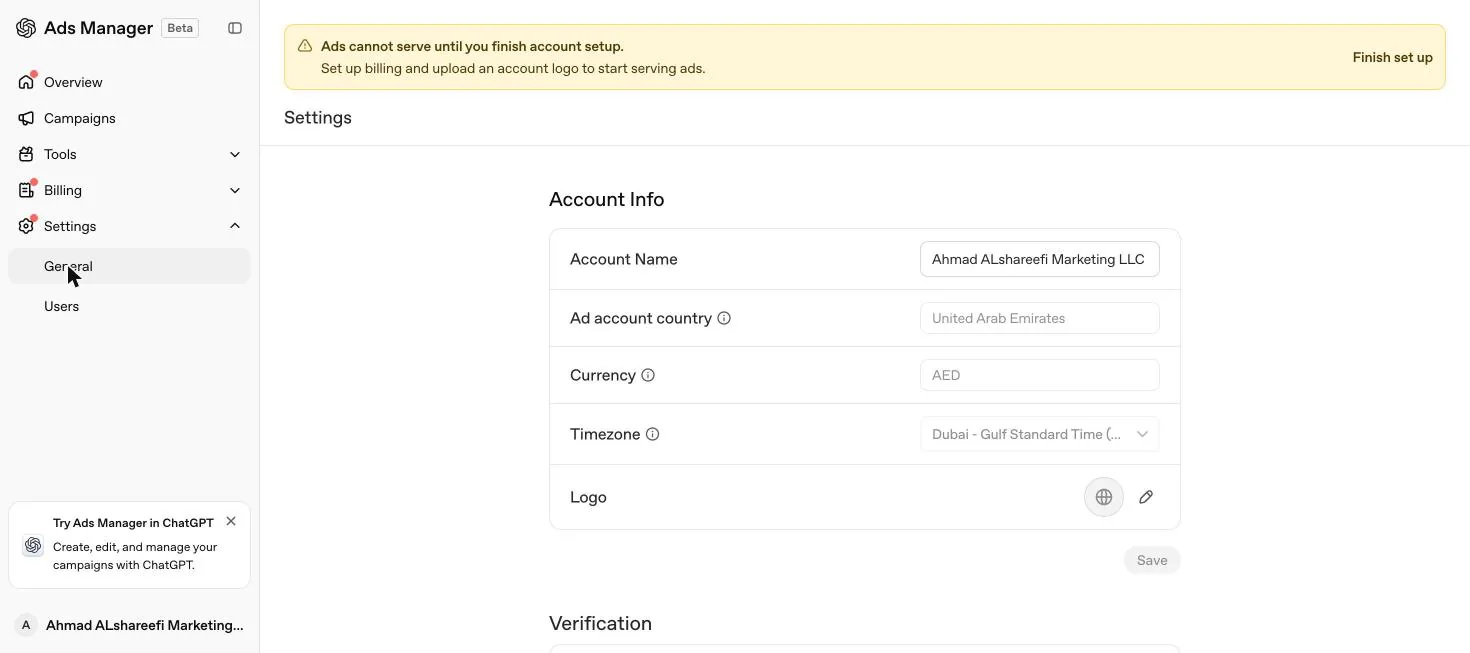
Go to Settings, then General, to review your logo, Account Name, Brand Name and Legal Name. The Brand Name is "The public name shown alongside your ads in ChatGPT", so set it the way your business should appear in ads, and use your registered business name for Legal Name.
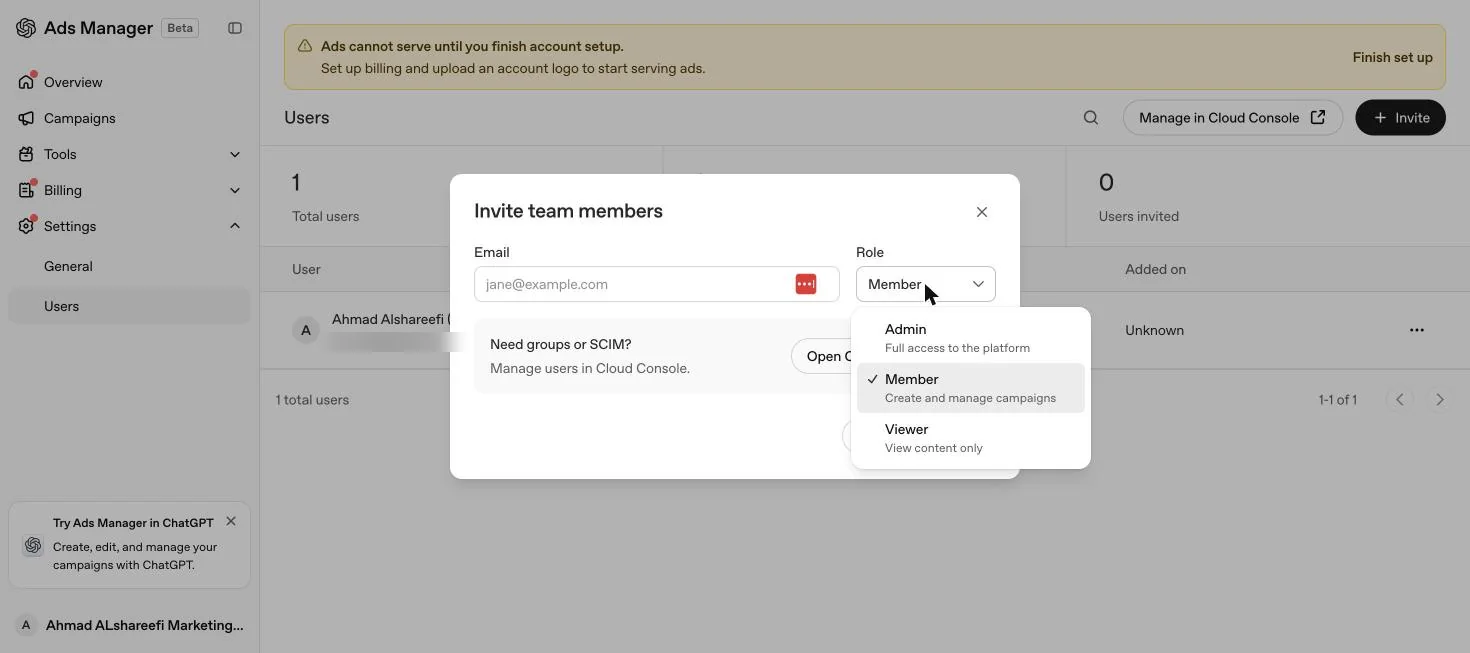
Two more steps follow: invite team members through Settings, then Users, then Invite, choosing Admin, Member or Viewer for each person, and complete account verification when Ads Manager asks for it. OpenAI's quickstart lists account verification as part of creating your account.
- Check eligibility
- Create the ad account
- Verify the business
- Add billing and logo
- Install measurement
- Build the campaign
- Add ad groups and hints
- Write the ads
- Pass review
- Go live and read results
What happens during verification
OpenAI does not publish the questions asked during verification. Its setup article says the Legal Name is used for billing and business verification, and its onboarding guide says the review may take up to 7 business days, with Ads Support as the contact if it takes longer. Two things are worth knowing before you start. First, OpenAI treats account verification, account approval, ad review and ad delivery as separate checks and says completing one does not mean all the others are complete, so watch the account status and any follow up prompts; a pending status "does not always mean an active review is underway." Second, a second account is not a shortcut: OpenAI states that creating additional accounts does not bypass verification, account review, or other eligibility requirements. If verification fails, OpenAI says it can fail when it could not verify the accuracy of your business identity, ownership, or affiliations, and asks you to make sure your account, ads and landing pages accurately represent your business.
Decisions that are hard to undo
OpenAI tells advertisers to review all required account details before submitting, including country or region, currency and time zone, and states that these three settings cannot be changed after account creation. Treat all three as permanent. For a UAE business that means United Arab Emirates, AED and Gulf Standard Time. Names are different: since 25 September 2026 the Account Name, Brand Name and Legal Name can be changed separately in Settings, then General, but a Brand Name change triggers brand review and pauses ad serving until the new name is approved, and a Legal Name change restarts business review and may pause ad serving. If the country, currency or legal entity is wrong, OpenAI's billing guidance is to contact support, and it notes you may need to create a separate advertiser account to bill under a different country, region or legal entity.
The minimum daily budget follows the billing currency you chose at setup, and for dirham accounts it is AED 65 per day. Choosing the wrong currency at this stage means every campaign budget downstream inherits that mistake.
Who should own the account, and the roles beneath them
Put the owner role with a person in your company, not with an agency and not with a staff member's personal email address. Agencies and freelancers are added as users with a lower role. If the relationship ends, their access is removed in one click and nothing about the account itself is lost.
Beneath the account owner, OpenAI structures access into three account specific roles, which our Ads Manager complete guide covers alongside the tenant wide admin roles that can create new accounts.
| Role | Scope | What it allows |
|---|---|---|
| Ad account admin | One account | Manages the account and its user access. OpenAI requires at least one effective admin to remain on every account at all times |
| Ad account member | One account | Creates and updates campaigns, ad groups and ads without account administration rights |
| Ad account viewer | One account | Views performance and settings without editing rights |
A person can hold more than one role if they wear more than one hat, for example managing tenant identity as well as administering the specific ad account. If someone has access through both a direct role and a group, OpenAI applies whichever is higher, so removing a direct role does not necessarily remove access that a group still grants.
If you manage multiple advertisers
Agencies, in-house teams running more than one brand, and consultants working across several client accounts all hit the same rule: OpenAI's setup article says to create a separate account for each advertiser, and it describes no shared account that several unrelated brands or clients advertise from at once.
The structure we use within that rule: the client, or each brand's own internal owner, creates their advertiser account and holds the owner role on it. The agency or consultant is then invited in as a user, with whichever role, Admin, Member or Viewer, the relationship actually needs. One OpenAI login can hold access across many separate advertiser accounts this way, and a person can switch between the accounts they have been invited into from inside Ads Manager, but the underlying accounts stay legally and structurally separate, each billed to its own entity and subject to its own country eligibility. An eligible self serve advertiser can also create additional ad accounts of their own from inside an existing one, through the account menu's Create account option where available, which matters for a company running several brands under one legal entity rather than working across unrelated client accounts.
Inviting an agency does not shortcut the client's own verification either, since OpenAI states that creating additional accounts does not bypass verification, account review, or other eligibility requirements. And if your team crosses the 10 account ceiling below, plan which accounts need a member with create rights versus which only need invited access, since the ceiling blocks creating new accounts yourself but not being invited to existing ones.
Creating more than one account
There is a ceiling on self serve account creation: once you belong to 10 or more ad accounts, whether created by you or joined by invitation, you cannot create another yourself. Falling under that count does not guarantee a new account can be created either, since eligibility, organisation permissions and other account creation requirements still apply. The limit only blocks self serve creation. You can still be invited to additional existing accounts beyond 10.
What's actually in Ads Manager Beta once access is granted
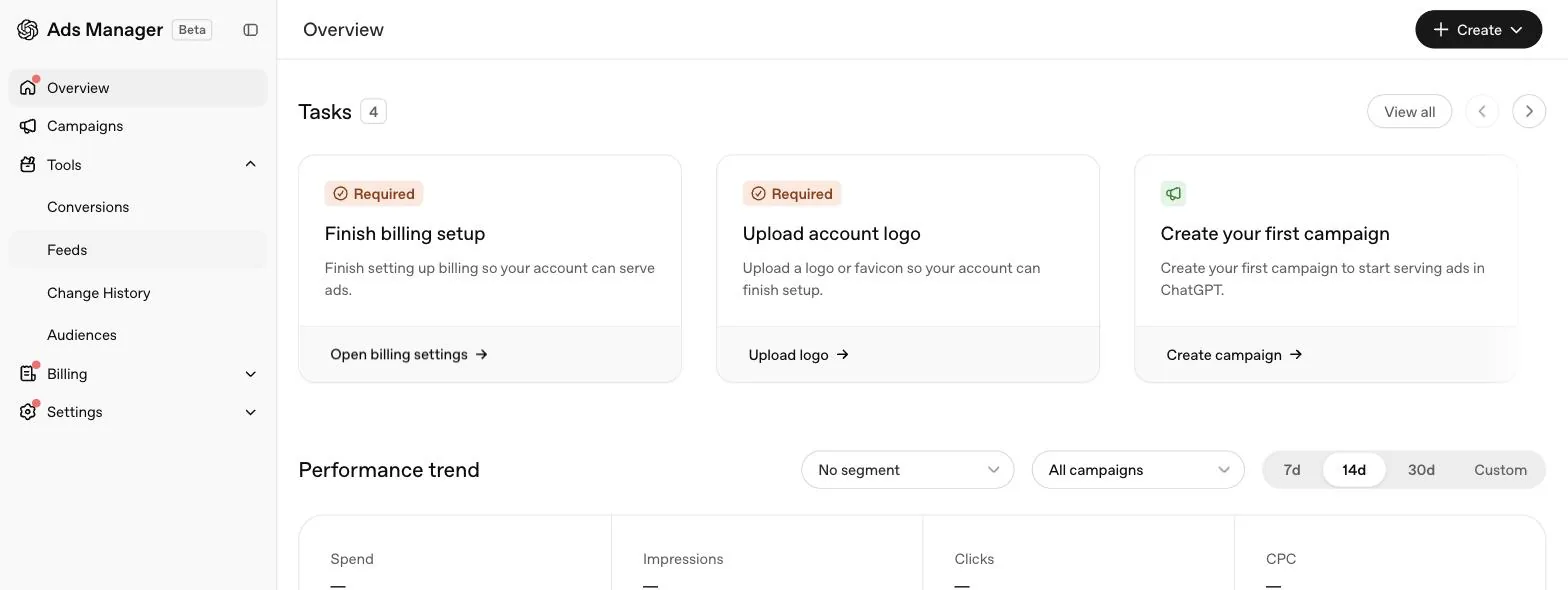
OpenAI describes Ads Manager Beta as supporting the core workflows needed to run a campaign end to end: creating and managing campaigns individually or at scale through bulk upload for supported campaign types, monitoring performance across table views, charts and CSV exports, and managing account level settings including members, permissions, API keys, billing details and change logs. We opened a fresh account of our own to check this first hand, on 21 September 2026, before billing and the account logo were finished. This is what the interface showed on that date, and it may look different once your own setup is complete.
Two Tools screens are worth knowing about before you need them. Audiences is where custom audiences are built, covered in our custom audiences guide. Feeds is where a product catalogue is connected by SFTP for product feed campaigns; on our account, with setup unfinished, its Create feed button was disabled, which is a useful early signal that the same account level completeness this whole guide describes is a prerequisite for feed campaigns too, not only standard ones. There was also a promo card in the sidebar reading "Try Ads Manager in ChatGPT. Create, edit, and manage your campaigns with ChatGPT," and OpenAI now documents that route as the ChatGPT Ads Manager plugin, which "connects to the Ads Manager accounts you can access", covered in our Ads Manager complete guide.
Inside the campaign builder, first hand
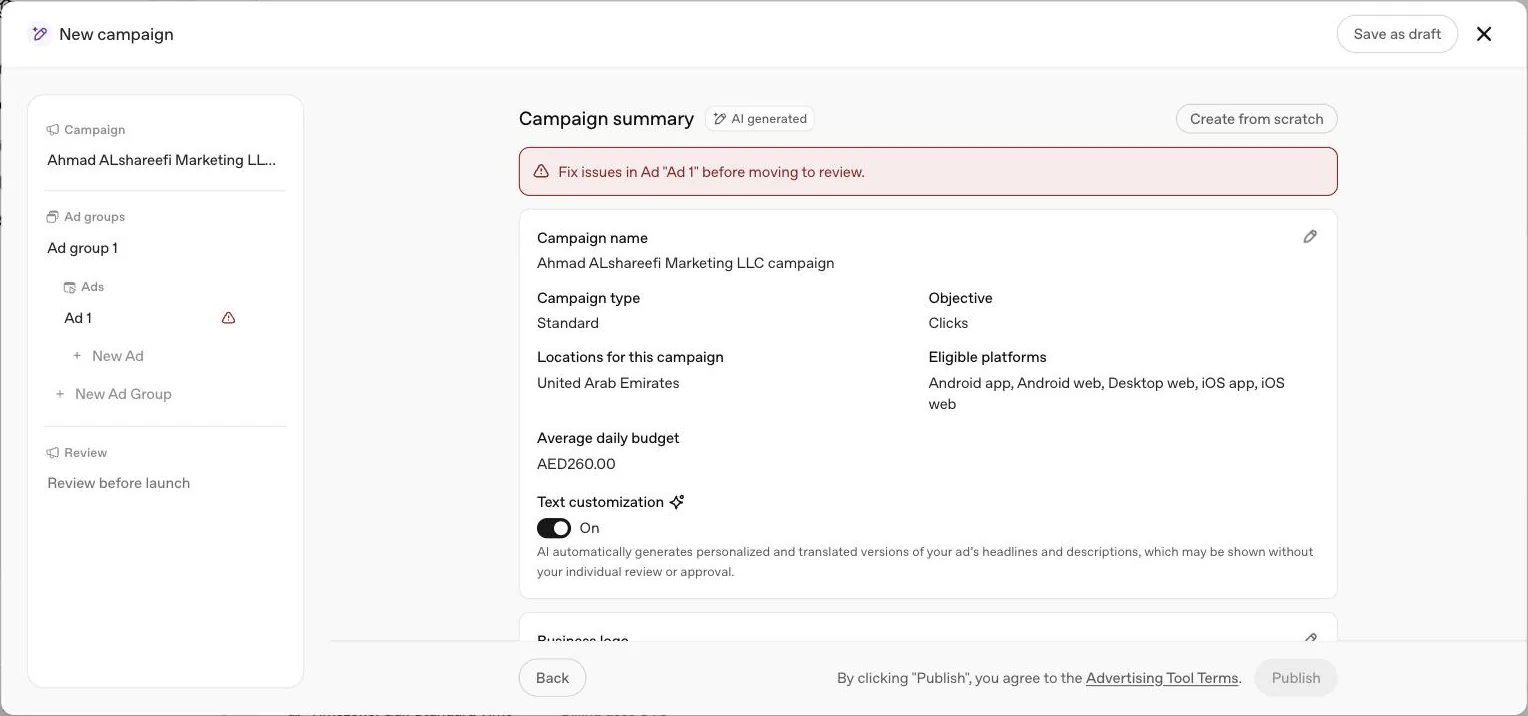
We opened the campaign builder in our own account on 21 September 2026, stepped through every screen, and closed it without saving or publishing anything, so what follows describes the builder itself, not a live campaign.
Clicking Create on the Campaigns screen offers two paths, Create campaign or Upload bulk. Create campaign opens a full screen panel, "New campaign," with a left rail listing Campaign, each Ad group and its Ads nested underneath, a New Ad Group option, then a final Review step, with Save as draft and a close button throughout.
Two things worth planning around before your first real campaign. The AI generated draft and the text toggle both mean Ads Manager is willing to write and translate copy on your behalf by default, so decide deliberately whether you want that on rather than discovering it after publishing. And because a saved draft drops the budget, treat it as a way to preserve structure, not a budget decision already made.
Common rejection reasons we've seen
Rejection happens at two points. Account level rejection stops the whole account before it can run anything. Ad level rejection, covered here, happens per ad during review, after the account is approved and active.
| Reason | What OpenAI states |
|---|---|
| Ad copy or landing page policy mismatch | A common cause. Ad copy, imagery or the landing page conflict with OpenAI's ads policies |
| Landing page blocks OpenAI's crawlers | The site blocks OAI-AdsBot or OAI-SearchBot, or blocks OpenAI's IP addresses, so the page cannot be reviewed |
| Image specification failure | Images must be PNG or JPG, square, no larger than 1200 by 1200 pixels, and publicly accessible at a URL that opens directly to the image rather than a preview or sign in page |
| Category not allowed in the target country | OpenAI's eligibility table lists most health categories, legal services and payments and remittances as Not allowed outside the US, and several financial categories as Restricted to Select Approved Advertisers. An ad can pass review and still be ineligible to serve in its selected countries |
| Landing page and ad promise do not match | OpenAI asks you to check that the complete ad and destination comply with its policies and describe the same offering |
If an ad is rejected, OpenAI's guidance is to check the ad's status in the Ads tab, hover the Not serving label for the specific stated reason, then edit and resubmit, or request another review if you believe the rejection was made in error. Our ads not showing guide covers the full diagnostic path for both ad level rejection and account level delivery problems.
International targeting for a brand new account
This catches UAE companies planning a Gulf wide launch from day one. OpenAI states that some new self serve accounts can initially advertise only in their home country, the country associated with the ad account at creation, and that selecting other countries in a campaign does not override that restriction. Eligibility to advertise elsewhere opens once identity verification is approved and the account has reached a required level of spend from campaigns run in the home country. Creating a campaign or raising a budget number alone does not unlock it. If your plan is to launch in the UAE and expand into Saudi Arabia, Qatar or another Gulf market, budget for a home country phase first rather than assuming multi country delivery from the first campaign.
Why approved accounts still show no delivery
| Symptom | Usual cause |
|---|---|
| Campaign is live, zero impressions | Logo or names not completed in Settings, then General |
| Campaign will not start | Billing profile or payment method incomplete |
| Ads marked Not serving | Ad review incomplete, or account verification still pending. Hover the status in Ads Manager for the specific reason |
| Campaign paused with no warning | Campaign budget limit reached, or the campaign end date has passed |
| Ad rejected | Creative, image or landing page conflicts with OpenAI's ads policies |
| Landing page flagged | The site blocks OpenAI's user agents, OAI-AdsBot or OAI-SearchBot |
| Delivery stopped mid week | Daily budget's weekly allowance used up early. Delivery can resume the following budget week |
OpenAI's own guidance for a newly launched campaign with no confirmed delivery and no clear blocker is to allow at least 24 hours after launch before reporting a zero delivery issue, and to contact support without waiting if you see a hard error or a clear billing or review blocker. Once ads are delivering, impressions, clicks and CTR refresh about every 15 minutes, while spend can be delayed 7 to 8 hours. Our ads not showing guide covers this diagnostic path in full.
Common mistakes
- Registering the account under a personal email rather than a company one. It works until the person leaves, and then the business no longer controls its own ad account.
- Entering the trading name instead of the legal name on the trade licence. OpenAI uses the Legal Name for billing and business verification, so it should match the registered entity.
- Assuming account approval means ads will serve. OpenAI treats account verification, account approval, ad review and ad delivery as separate checks, and billing must be set up before campaigns can deliver. All of them need to be complete.
- Opening a second account to get around a pending review. OpenAI states that creating additional accounts does not bypass verification, account review, or other eligibility requirements.
- Picking the wrong currency at setup to chase a lower minimum daily budget. The currency is permanent, and reporting, invoicing and the minimum spend all follow it. Match it to how your business actually manages cash, not to the smallest number on the list.
- Planning a first campaign across several Gulf countries at once. A new self serve account can be restricted to its home country until verification and a spend threshold are met.
- Trying to run several client accounts through one shared login as if it were an agency master account. OpenAI's setup article says to create a separate account for each advertiser; build access through invitations instead.
The UAE specifics
Set the account country to United Arab Emirates, the billing currency to AED and the time zone to Gulf Standard Time, since all three lock permanently at creation. The minimum daily budget for dirham billed accounts is AED 65. Use the legal business name exactly as it reads on your trade licence, whether the entity is mainland or a free zone company, since OpenAI uses the Legal Name for billing and business verification, not a trading or marketing name. If your business operates in a regulated sector, check OpenAI's eligibility table first: outside the US it lists most health categories, legal services and payments and remittances as Not allowed, and several financial categories as Restricted to Select Approved Advertisers, as our ChatGPT ads policies guide explains. Separately confirm with your UAE regulator what its advertising rules require before your first campaign goes live. For hands on setup support, see our account setup service.
What to do once you have access
Build the first campaign with one clear objective, UAE as the target country and a daily budget you can hold for four weeks. Then write context hints and several distinct ad variations per offer, following our context hints guide and ad examples guide. Use the guided, step by step creation flow for your first campaign rather than bulk upload, since OpenAI's quickstart describes guided creation as the step by step flow and bulk upload as the way to create and manage campaigns at scale, which suits you better once you understand how a campaign, ad group and ad relate to each other; our bulk upload guide covers the schema once you are ready for that. For the full campaign, ad group and ad structure, read our Ads Manager complete guide, and check our ChatGPT ads news page periodically, since account setup itself is one of the areas OpenAI continues to adjust during the beta.
Quick answers
How long does account approval take?
OpenAI says business verification may take up to 7 business days, and to contact Ads Support if it takes longer. It also treats account verification, account approval, ad review and ad delivery as separate checks, so finishing one does not mean the others are done.
Can an agency open the account for us?
OpenAI's setup article says to have one person create the advertiser account, then invite anyone else who needs access, and to create a separate account for each advertiser. We recommend the owner is someone inside your company, with the agency added afterwards as a user.
Why are my approved ads not serving?
Two setup items block delivery most often: billing, which OpenAI says must be set up before campaigns can deliver, and the logo and names it asks you to confirm in Settings, then General, before campaigns start delivering. OpenAI also lists incomplete verification, an exhausted budget and a campaign end date that has passed as reasons ads stop serving.
How many ad accounts can one login hold?
One OpenAI login can access multiple ad accounts. Once you belong to 10 or more, counting both accounts you created and accounts you were invited to, you cannot create another yourself, though you can still be invited to existing ones.
Can a UAE company advertise in Saudi Arabia from the same account straight away?
Not always immediately. OpenAI says some new self serve accounts can initially advertise only in their home country, and become eligible for other listed countries once identity verification is approved and the account has spent enough in its home country.
What verification does OpenAI ask for during setup?
OpenAI's current setup article does not list the verification questions. It says the Legal Name is used for billing and business verification, and its onboarding guide says verification may take up to 7 business days and can fail when OpenAI could not verify the accuracy of your business identity, ownership, or affiliations.
What can I actually see and do once access is granted?
An Overview screen with setup tasks and a performance trend chart, a Campaigns screen with Campaigns, Ad groups and Ads tabs, a Tools section covering Conversions, Feeds, Change History and Audiences, plus Billing and Settings. This is what we saw first hand in our own new UAE account on 21 September 2026.
Why was my ad rejected during review?
OpenAI's most common causes are ad copy or a landing page that does not align with its ads policies, or a landing page that blocks OpenAI's own crawlers, OAI-AdsBot or OAI-SearchBot. Hover the ad's status in Ads Manager for the specific stated reason.
Can I manage more than one advertiser's account from one login?
Yes. A person with an OpenAI login can be invited into several separate advertiser accounts and switch between them, but OpenAI's setup article says to create a separate account for each advertiser.
Does creating an account before my country is listed give me early access?
No. OpenAI's FAQ states plainly that creating an account does not grant access before your country is supported. You can still create one and OpenAI says it will notify you when access opens.
Related
ChatGPT Ads Manager guide
ChatGPT Ads Manager, also called OpenAI Ads Manager, explained level by level: account, campaign, ad group and ad, what cannot be edited later, and a launch checklist.
ChatGPT ads in the UAE
The UAE is on OpenAI's self service list. Who qualifies, the AED 65 daily minimum, how billing and account setup work and a four week test plan.
Context hints
Context hints replace keywords in ChatGPT ads. What OpenAI says they are, how they differ from keywords and traditional targeting, five patterns and UAE examples.
Ads not showing? Fixes
Zero impressions, rejected ads, failed uploads, blocked bots and delivery that drops for no reason. Every check OpenAI lists, in the order that solves most accounts fastest.
Bulk upload checklist
The three tab bulk upload schema for OpenAI Ads Manager, every required column, the formatting rules that cause silent failures and how to fix a rejected file.
News and rollout timeline
A dated log of the ChatGPT ads rollout, from the February 2026 US test to the UAE in September and 89 self service markets by 31 October 2026. Each entry names its source.