
Every level of OpenAI Ads Manager explained: account, campaign, ad group and ad, what each screen shows, what cannot be edited later, and a launch checklist.
On this page
- The short version
- What OpenAI Ads Manager actually is
- The four levels, in one table
- Level 1: the account
- What the interface looks like day to day
- The ChatGPT Ads Manager plugin: running your account from a conversation
- Beta limitations: what OpenAI confirms today
- Brand safety and where ads can't appear
- Level 2: the campaign
- Level 3: the ad group
- Level 4: the ad
- Inside the campaign builder, step by step
- Two ways to build: guided or bulk upload
- Reading performance in Ads Manager
- Editing after launch
- Why a campaign shows Not serving
- Common mistakes
- Two UAE launch scenarios
- Launch checklist
- What OpenAI has not published
- A short glossary
- How this compares to Google Ads and Meta Ads Manager
- The UAE specifics
- Quick answers
The short version
OpenAI Ads Manager has one structure everywhere: account, then campaign, then ad group, then ad. The account holds billing and users. The campaign holds the objective, budget and country targeting. The ad group holds context hints and bids. The ad holds the actual title, copy, image and landing page. Get the order right and every setting below has an obvious home. This guide walks the whole hierarchy, tours the screens themselves as we saw them in our own account, names what cannot be changed after launch, and ends with a checklist to run before you submit.
What OpenAI Ads Manager actually is
OpenAI describes Ads Manager Beta as the platform for creating, launching and managing campaigns in ChatGPT Ads, with tools to monitor performance and make updates in one place, and is explicit that it is a beta product that will keep evolving. Three workflows sit inside it, in OpenAI's own framing: create and manage campaigns, either individually in the guided workflow or at scale with bulk upload for supported campaign types; monitor performance, tracking impressions, clicks and spend across campaigns, ad groups and ads through table views, charts and CSV exports; and manage account settings, covering members, permissions, API keys, billing details and change logs. Because the beta is still evolving, OpenAI is upfront that some capabilities are limited today and more will be added over time.
Logging in
Ads Manager lives at ads.openai.com and needs an OpenAI account to sign in; if you do not already have one, OpenAI lets you create it during the same sign up flow. From there, sign up walks through business details, account details, and identity verification, covered in full below. There is a second entry point too: an eligible business advertiser can begin the same self serve setup from inside a ChatGPT conversation through ChatGPT Ads Manager, detailed further down this guide.
Who can use it, and who sees the ads
Ads Manager itself is for the advertiser. The ads it produces are shown to a different, separate audience: OpenAI states that ads may appear for users on the no cost plan and the Go plan, while Plus, Pro, Business, Enterprise and Edu accounts do not see ads at all, and OpenAI does not show ads to any account identified as belonging to someone under 18, based on account level age information and age prediction where available. A no cost plan user who would rather not see ads can also switch to an ads off option in ChatGPT settings, trading ads for lower usage limits rather than paying for a subscription. None of this is something an advertiser configures; it is a platform wide rule that applies regardless of your campaign settings.
The four levels, in one table
| Level | What lives here | Can you have more than one? |
|---|---|---|
| Account | Legal entity, billing, currency, users and roles | One per advertiser, though a company can hold several accounts for different brands |
| Campaign | Objective, budget, dates, country and platform targeting, custom audiences | Many per account, up to 5,000 |
| Ad group | Context hints, bid strategy, bid amount, audience bid adjustments | Many per campaign, up to 5,000 total |
| Ad | Title, copy, landing page, image, advertiser name and favicon | Many per ad group, up to 5,000 total |
This structure is identical whether you build in the guided workflow or through bulk upload. If you have not opened an account yet, start with our account setup guide, which covers the five onboarding steps in full, or read our full step by step walkthrough for the whole journey in order.
Level 1: the account
The account is where OpenAI verifies who you are and where the money comes from. OpenAI's own setup guidance breaks it into five steps: access Ads Manager and create the account, complete onboarding and verification through a provider called Persona, complete account information, set up billing and payment, then invite team members. Only one account owner should create the advertiser account, and campaigns will not deliver until every required step is complete.
Inside the account you manage:
- Account info: the advertiser name and logo that appear on every ad. OpenAI states ads will not serve until these are set, in Settings, then Account info.
- Billing: a billing profile with business name, invoice email and address, plus a payment method, in Settings, then Billing.
- Users: team members invited with a role, covered below, in Settings, then Users.
- Change logs and API keys, for teams that need an audit trail or programmatic access to send data to measurement partners.
Country, billing currency and time zone are set once at account creation and OpenAI says they cannot be changed afterward; the stated fix for a wrong entry is to create a new advertiser account. Get these right the first time. For a UAE company that is United Arab Emirates, AED and Gulf Standard Time. A company can also hold more than one advertiser account, for example for different brands or legal entities, and one OpenAI login can be used across all of them, though OpenAI caps self serve account creation at 10 accounts belonged to in total, counting accounts you created and accounts you were invited to.
Managing multiple ad accounts
Each advertiser needs its own separate account; one account cannot advertise for several unrelated businesses. To add one, sign in with your existing login, select an eligible self serve account on card billing, and use Create account from the account menu where available. Once you belong to 10 accounts, whether created or joined by invitation, you cannot create another yourself, though you can still be invited into further ones. Agencies working across several clients typically hit this ceiling fastest, so plan which login holds account creation rights before it becomes a blocker.
Roles and who should hold them
Access to Ads Manager depends on two separate things: a permitted sign in method, and a role assigned to the correct advertising account. Being part of the same company tenant, or using single sign on, does not by itself grant access.
Our view: put the admin role with someone inside your company, and add an agency as a member. If a person has more than one path to access, OpenAI applies whichever role is highest, in the order Admin, then Member, then Viewer, and removing a direct role does not remove access a group still grants, so check both when someone leaves. For companies using single sign on, OpenAI recommends leaving the Ads sign in policy on Optional while testing, since a Required policy can still let someone already signed in through without re-authenticating. Synchronised users and groups come from a tenant wide directory, not a separate one per account, so access still has to be assigned account by account.
Account settings, tab by tab
OpenAI names members, permissions, API keys, billing details and change logs as what account settings cover. Here is what sits behind each label, drawn from the account setup, billing and identity articles.
| Settings tab | What it holds |
|---|---|
| Account info | Account name and logo, exactly as they should appear inside every ad unit |
| Users | Invite team members by email and assign Admin, Member or Viewer for this account |
| Billing | Billing profile (business name, invoice email, address), payment method, tax and VAT IDs, account limits for eligible postpaid accounts |
| API keys | Created here for measurement partner integrations such as Fospha, Hightouch, LiveRamp, Singular, Triple Whale and WorkMagic |
| Change logs | An audit trail of account level changes, for teams that need to trace who changed what |
What the interface looks like day to day
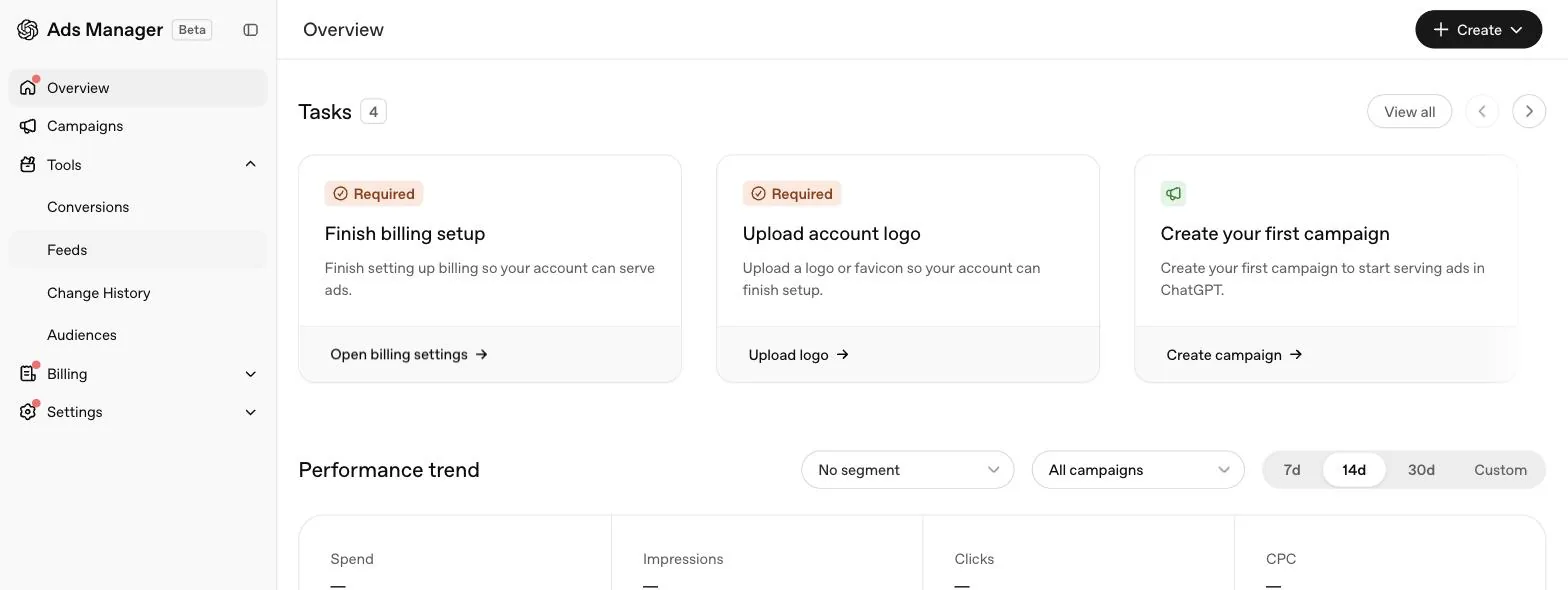
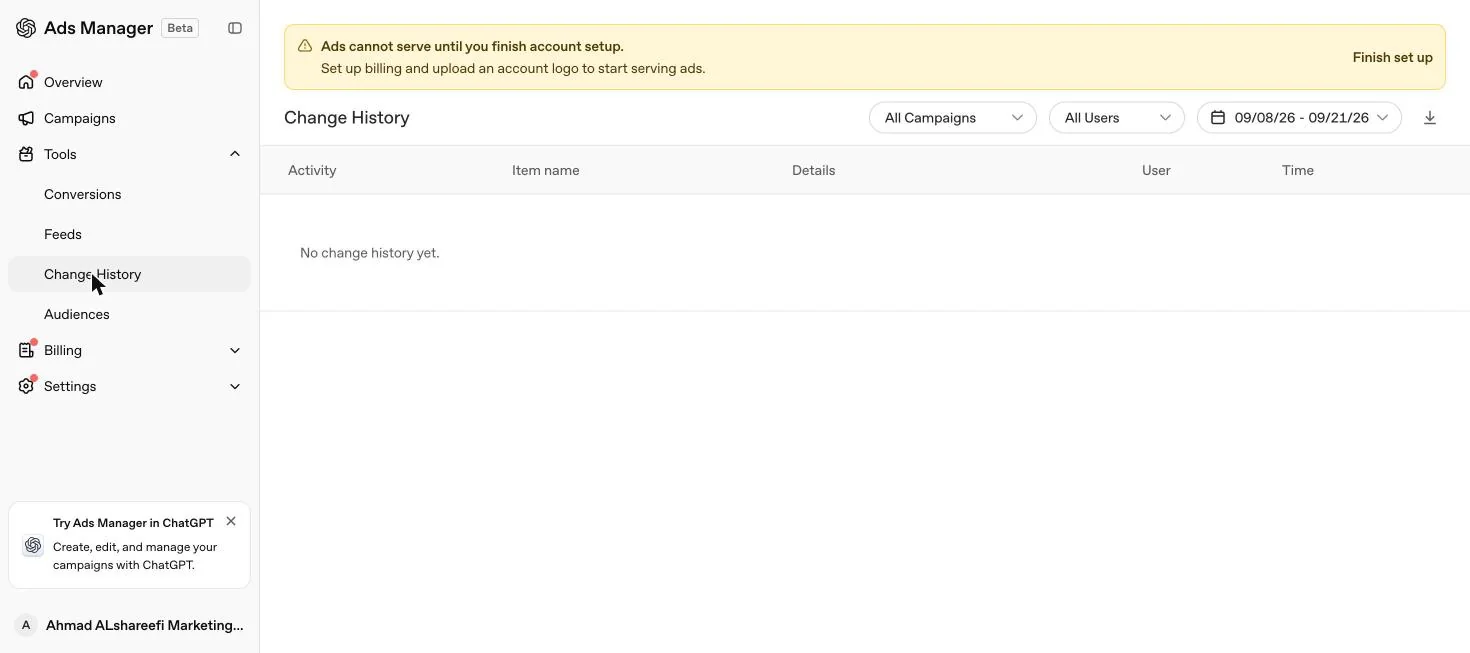
What follows is what we saw in our own account on 21 September 2026, with setup not yet finished, so labels and empty states may change as the beta evolves.
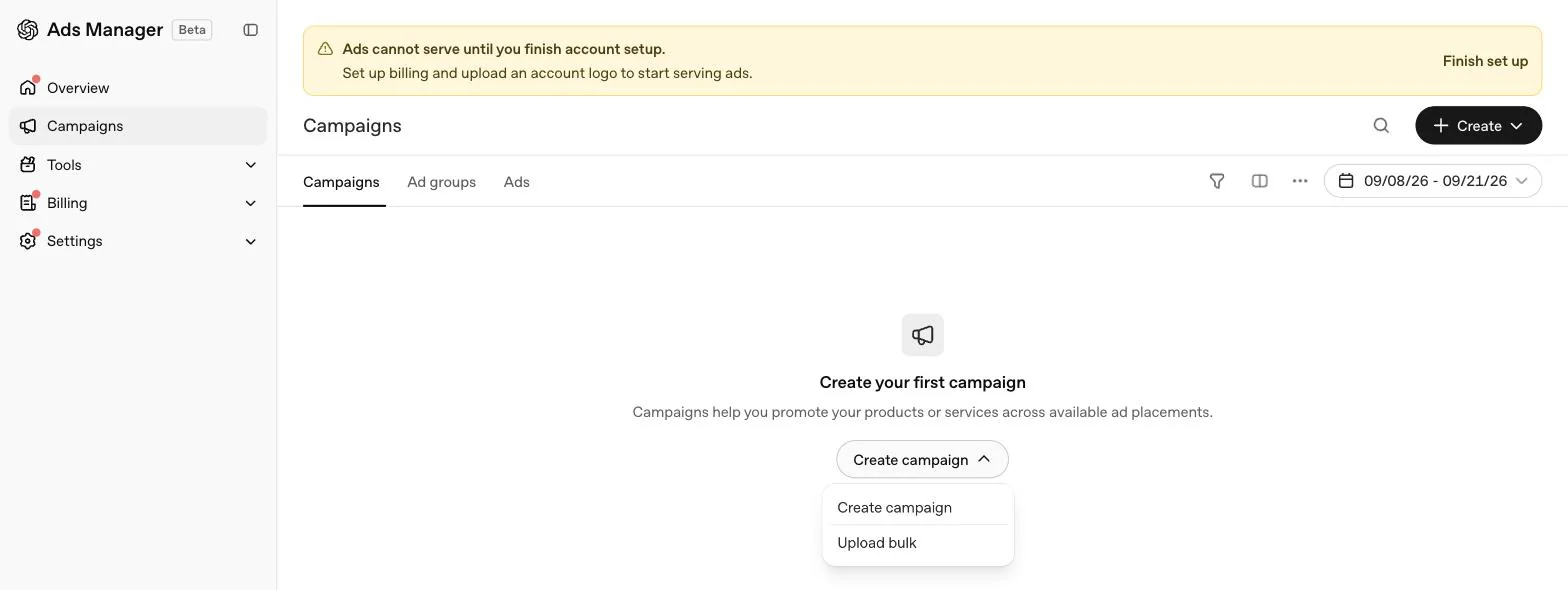
An incomplete account shows a persistent banner explaining that ads cannot serve until account setup is finished, pointing specifically at billing and the account logo, with a link through to finish setup, matching OpenAI's own written guidance that account information and billing are separate gates from approval. A sidebar card also promotes a ChatGPT native path for creating, editing and managing campaigns directly from a conversation. This is a real, supported workflow for eligible business advertisers, letting you begin self serve setup and work with supported campaigns, ad groups, ads and performance insights from inside a ChatGPT conversation, though remaining billing, payment, tax or identity verification steps still finish in Ads Manager itself, and agencies creating accounts on a client's behalf are not supported through this path.
The Timezone footer note is worth pausing on: reporting runs on the account's chosen time zone while billing uses UTC, a reconciliation gap worth knowing before the first invoice lands.
The ChatGPT Ads Manager plugin: running your account from a conversation
Alongside the ads.openai.com dashboard, OpenAI supports a second, ChatGPT native path called ChatGPT Ads Manager, which is what the sidebar card in our account was promoting. It is built for eligible business advertisers, and OpenAI is specific about what it does and does not replace.
Open ChatGPT Ads Manager and connect
Open it from within ChatGPT and connect your account when prompted.
Ask ChatGPT to set up a business advertiser account
Select an eligible organisation, or create a new one where that option is available.
Review the details before confirming
Advertiser name, website, business country or region, currency, time zone and logo, since several of these lock permanently once the account exists.
Finish the rest in Ads Manager itself
Any remaining billing, payment, tax or identity verification steps happen back in Ads Manager. Campaigns may not serve until required setup and review are complete.
Two limits are worth knowing before you rely on this path. First, individual advertiser onboarding is not supported, and neither is an agency creating an advertiser account on a client's behalf; an agency can only be invited to an account once the client itself has created it. Second, once an account exists, eligible business advertisers can go on to work with supported campaigns, ad groups, ads and performance insights from inside ChatGPT, though OpenAI notes available actions can vary, so treat it as a genuinely useful companion to the dashboard rather than a full replacement for it, especially for detailed bulk upload work.
Beta limitations: what OpenAI confirms today
OpenAI is direct that ChatGPT Ads is still in beta and in the early stages of scaling. Its own account of the timeline: a focused pilot ran from February through April, and the platform is now expanding through self serve onboarding in Ads Manager Beta. As it stands today, OpenAI states Ads Manager Beta supports core campaign creation, billing, access management and reporting workflows, along with conversion measurement and CPC bidding, and that these capabilities will keep being expanded. Two practical consequences follow directly from beta status, in OpenAI's own words: ongoing improvements to delivery systems and models can cause delivery and spend to fluctuate during the beta, and for conversion optimised campaigns the stated goal is to improve conversion outcomes, not simply to use the full budget. Budget advertisers accordingly, particularly in the first few weeks of a new account, and expect settings, defaults and even navigation labels to shift as the product matures.
Brand safety and where ads can't appear
OpenAI's stated policy is to place ads only near chats that are safe, appropriate and aligned with user trust and brand safety, with safeguards designed to prevent ads appearing in sensitive user contexts or brand unsafe environments. Two rules sit underneath that policy statement. Ads are not eligible to appear near sensitive or regulated topics, including personal health, mental health or politics, regardless of who the advertiser is. Separately, advertisers in sensitive or regulated categories such as health and financial services may still be eligible to advertise, but only if they meet OpenAI's own strict eligibility criteria during account verification, and even an eligible advertiser in one of those categories will not have its ads placed near sensitive personal conversations. OpenAI also states plainly that ads do not influence ChatGPT's answers, run on separate systems from the chat model, and that seeing an ad is not an endorsement by OpenAI. If your business sits in a regulated UAE sector, expect this screening in addition to, not instead of, your own regulator's advertising rules.
Level 2: the campaign
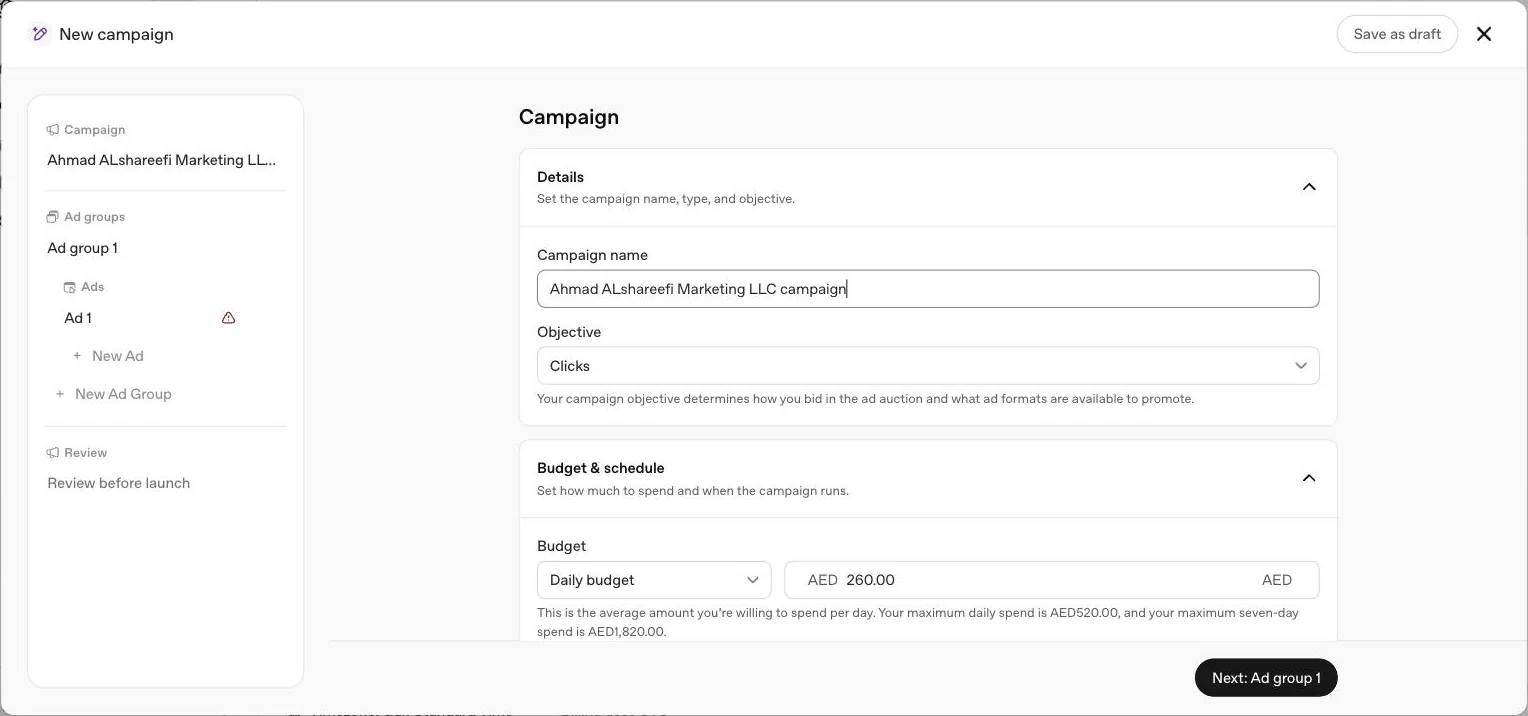
A campaign defines the objective, the budget and who is eligible to see the ads inside it. OpenAI lists these fields on every campaign: title, objective, conversion event where relevant, budget, start and end dates, countries to target, platforms to target and custom audiences to include or exclude.
Choosing the objective
OpenAI is explicit that you never pay per conversion, whichever conversion billing option you choose. It is also explicit that the objective and billing model cannot be changed after the campaign is created; existing CPM, CPC, oCPC or oCPM campaigns cannot be switched to a different objective. If you built a Clicks campaign and later want oCPC, you build a new campaign, though an existing conversion campaign can be cloned to speed up creating a new oCPM version. Full detail on conversion campaigns, including how Bid Cap actually works, is in our conversion campaigns guide and on pricing in our cost guide.
Setting the budget
Two budget types exist, and OpenAI is direct that the choice between them is one of the harder ones to reverse: a campaign total budget can later be changed to a daily budget, but OpenAI says you cannot change it back. If you are new to the platform, start with a daily budget so you can watch delivery before committing to a fixed lifetime number.
A daily budget is treated as an average over a seven day week that OpenAI defines as Sunday through Saturday in the account's time zone. Spend on one day will not exceed twice the daily budget, and spend across the week will not exceed seven times it, subject to proration when the budget changes mid week. If a campaign uses its weekly allowance early, it can stop delivering for the rest of that week even while marked active. A campaign total budget instead paces against your remaining budget and, where set, your end date; OpenAI recommends setting one, because a campaign without an end date defaults to a 60 day planning window, up to a maximum pacing period of 365 days with one set. Changing your bid strategy does not override total budget pacing. Our daily budgets and pacing guide has the worked numbers.
Dates, countries and platforms
Give a campaign enough runway to gather meaningful data before judging it, and think about seasonality, launches and promotions when picking the end date. Country targeting decides where ads are eligible to appear, and for most campaign types you are not limited to country level: OpenAI supports targeting sub-national locations such as states, cities, markets and postal codes where available, searchable during setup. Product feed campaigns are the exception, supporting geographic targeting only at country level for new campaigns.
OpenAI flags one trap for new self serve accounts: some can initially advertise only in their home country, and selecting other countries does not override that. Eligibility elsewhere opens up once identity verification is approved and the account has spent enough in its home country, not simply by creating a campaign or raising a budget.
Platform targeting is optional and lets you choose from five surfaces, all selectable together or separately in the campaign dialog.
| Platform surface | What it is |
|---|---|
| Android app | The ChatGPT Android application |
| Android web | ChatGPT accessed through a browser on Android |
| Desktop web | ChatGPT accessed through a browser on desktop |
| iOS app | The ChatGPT iOS application |
| iOS web | ChatGPT accessed through a browser on iOS |
Insights can be segmented by platform afterward, in the Segment menu, to see how each of the five performed.
Custom audiences at campaign level
A campaign can include or exclude custom audiences built from your own customer lists. Full detail, including file preparation and identifier formatting rules, is in our custom audiences guide.
| Identifier type | Notes |
|---|---|
| Email address | Normalised to lowercase, spaces trimmed, one @ required |
| Phone number | E.164 format with country code; numbers without one are rejected |
| SHA-256 hashed email | 64 character hex digest of the normalised, lowercase, trimmed email |
| SHA-256 hashed phone | 64 character hex digest of the normalised E.164 number |
| Google Advertising ID (GAID) | Used as is, not hashed, dashes kept |
Uploads are a UTF-8 CSV or TXT file up to 500 MB, mixing identifier types is allowed in one CSV, and an audience can hold more than five million members, added across multiple uploads if needed. The rules worth knowing at campaign level: inclusion targeting needs at least 25,000 matched users, 100,000 recommended, while smaller lists can still be used for exclusions; a campaign can use inclusion, exclusion, or both, and if both are used the audience remaining after exclusions must still clear 25,000; and for the EEA or Switzerland, OpenAI's advice is to avoid custom audiences while ads personalisation is unavailable there. Uploaded audience files themselves are deleted after processing, usually within 24 hours.
Level 3: the ad group
An ad group is where a campaign's budget gets pointed at a specific theme, product or customer need. OpenAI's own example is a plumbing business running separate ad groups for emergency repairs and preventive maintenance, same company, different need, different messaging.
What lives on the ad group
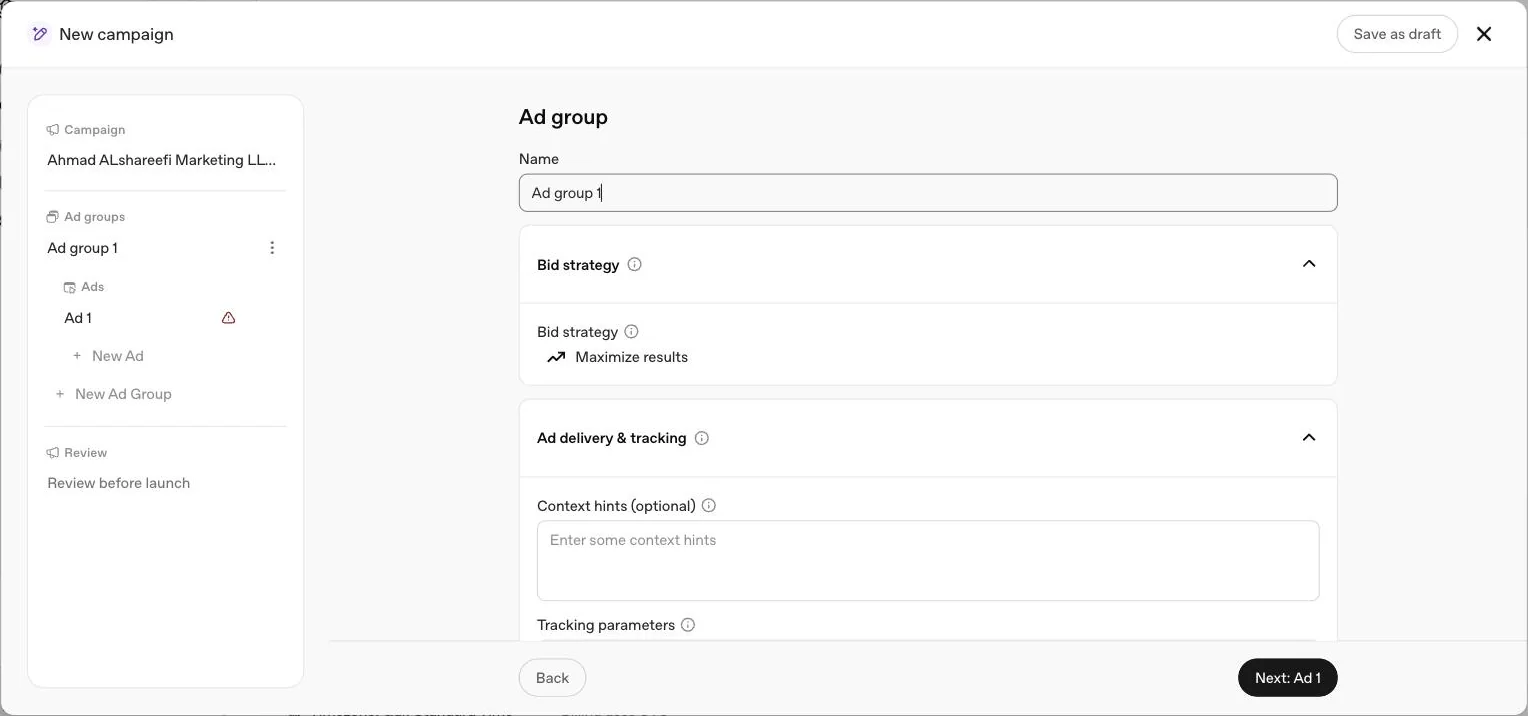
Bid strategy in plain terms
Maximize results hands bid decisions to OpenAI's system, aiming to get as many clicks or conversions as the budget allows. OpenAI states it prioritises result volume and does not guarantee a specific cost per result, CPA, CPC or ROAS. For a hard ceiling on what you pay per click or per 1,000 impressions, choose Manual: Max bid instead; there is no recommended bid amount, so it is set from your own numbers and adjusted as delivery data comes in. See our bidding strategies guide for the full comparison.
Structuring ad groups well
OpenAI's guidance, in order: choose a clear focus, use a descriptive title, separate meaningfully different use cases into their own ad groups, and put multiple ads inside one to test messaging on the same theme. Our own addition: keep one landing page per ad group. When a group mixes two customer needs it usually needs two landing pages too, and that is the signal to split it.
Level 4: the ad
The ad is what a ChatGPT user actually sees. OpenAI lists six parts of every standard ad: advertiser name, favicon, title, copy, landing page and image, and the first two are inherited from account settings rather than set per ad.

Copy: new information that expands the title, in plain language.
| Field | OpenAI's guidance |
|---|---|
| Title | 16 to 24 characters recommended, 50 maximum. Spell out the value clearly, prioritise useful detail over broad marketing language |
| Copy | 32 to 48 characters recommended, 100 maximum. Complement the title with new information rather than repeating it |
| Landing page | Link to the specific product or content page, not a generic homepage. Must be reachable and must not block OpenAI's OAI-AdsBot or OAI-SearchBot |
| Image | PNG or JPG, square, no larger than 1200 by 1200 pixels, publicly accessible and opening directly to the image. OpenAI names public Google Drive links, AWS S3 or CloudFront, or your own domain or CDN as supported hosting |
| Tracking | Add your own UTM parameters to each destination URL |
OpenAI's overall advice is to build for coverage, not one message: many distinct title and copy variations per offering, each a different angle, so the system can find more moments where an ad is genuinely relevant. Full worked examples for UAE industries are in our ad examples guide and context hint examples guide.
Dynamic URL parameters
Beyond a static UTM tag, Ads Manager supports dynamic landing page query parameters using your own text or OpenAI's macros, including {campaign_id}, {ad_group_id}, {ad_id} and {ad_account_id}, filled in automatically at delivery. Configure these from the three dot menu on Campaigns, Ad groups or Ads: Edit, then Landing page query parameters. When the same parameter is set at more than one level, the more specific one wins: Ad URL, then Ad, then Ad Group, then Campaign.
Suggested ad drafts
Ads Manager can offer an "Add new ad" option that prefills a draft from your existing website metadata, image, title and description included, for you to review and edit. OpenAI is explicit that this feature does not generate new copy or imagery with AI. It reuses what is already on your site.
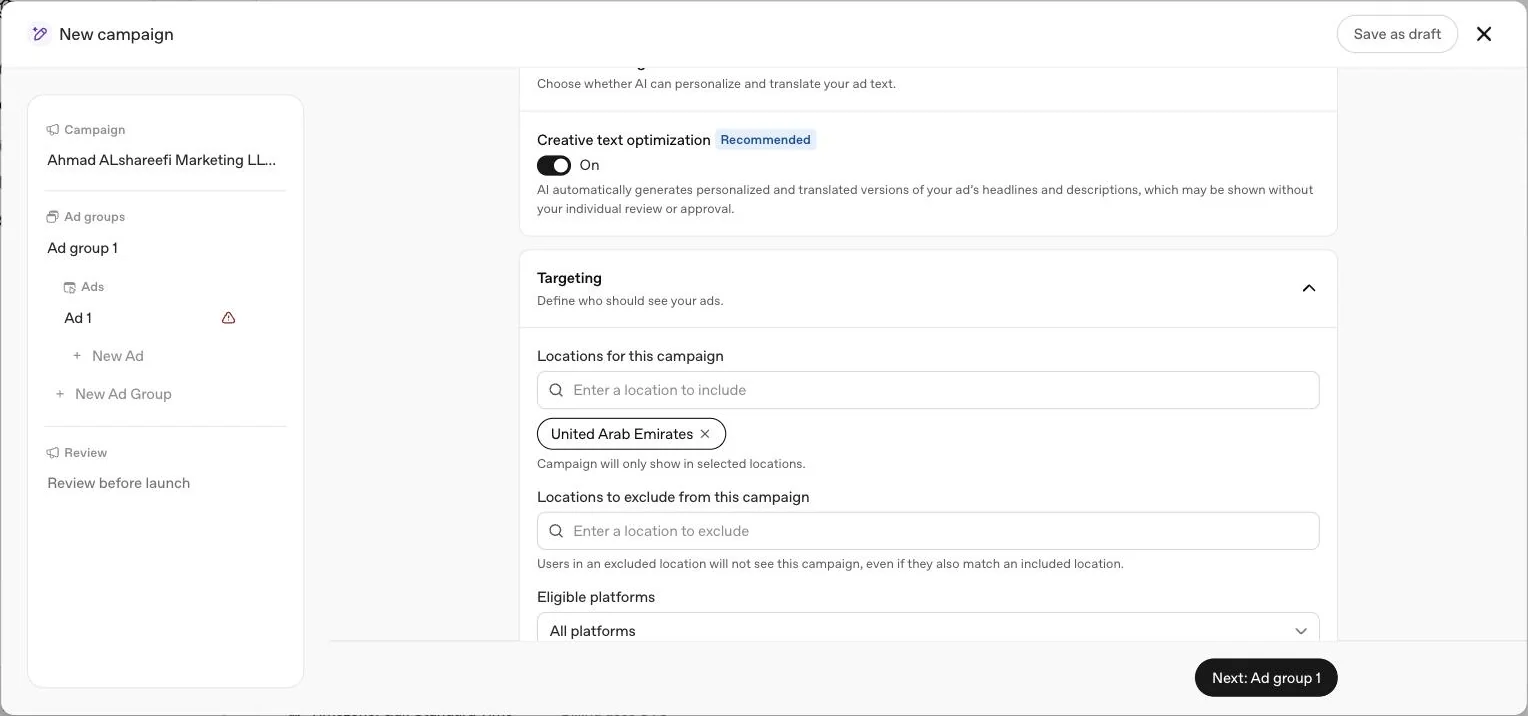
Inside the campaign builder, step by step
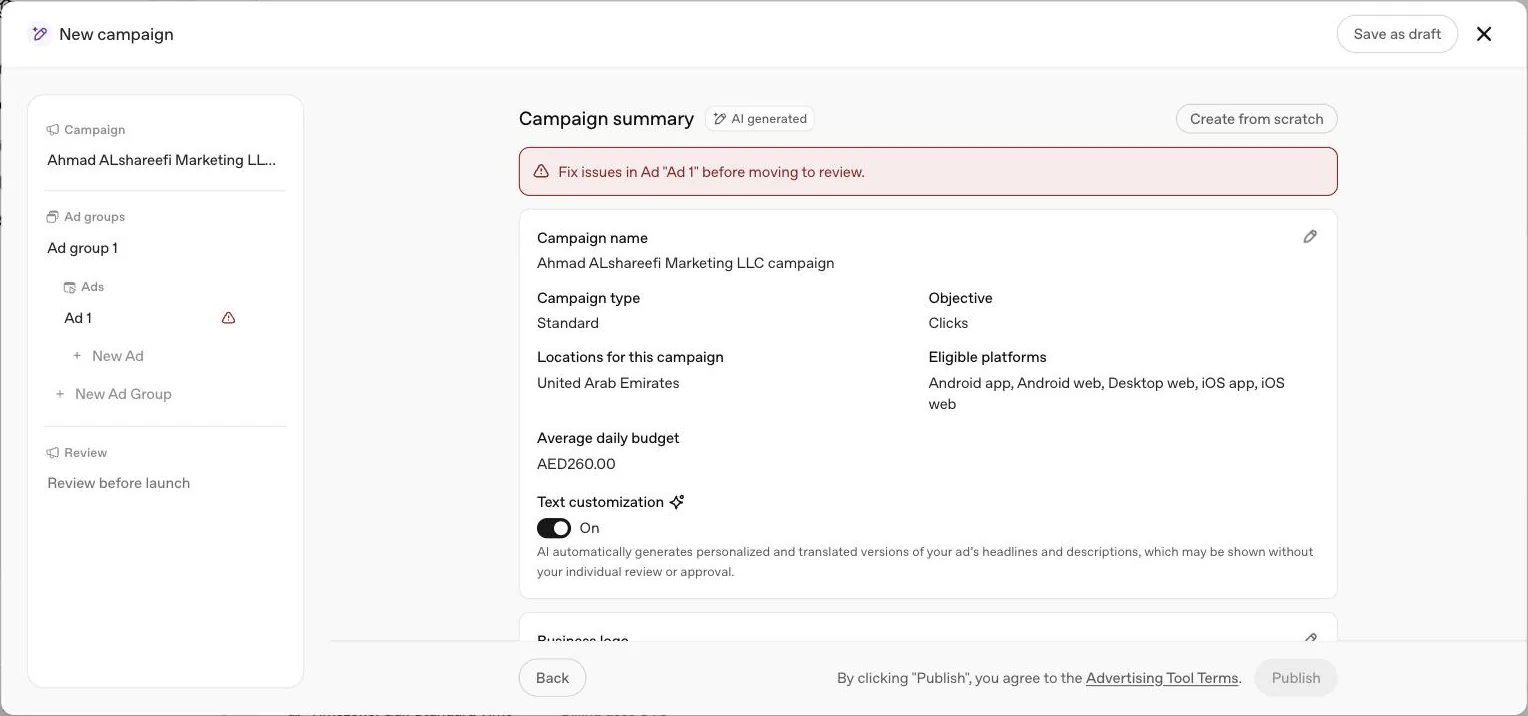
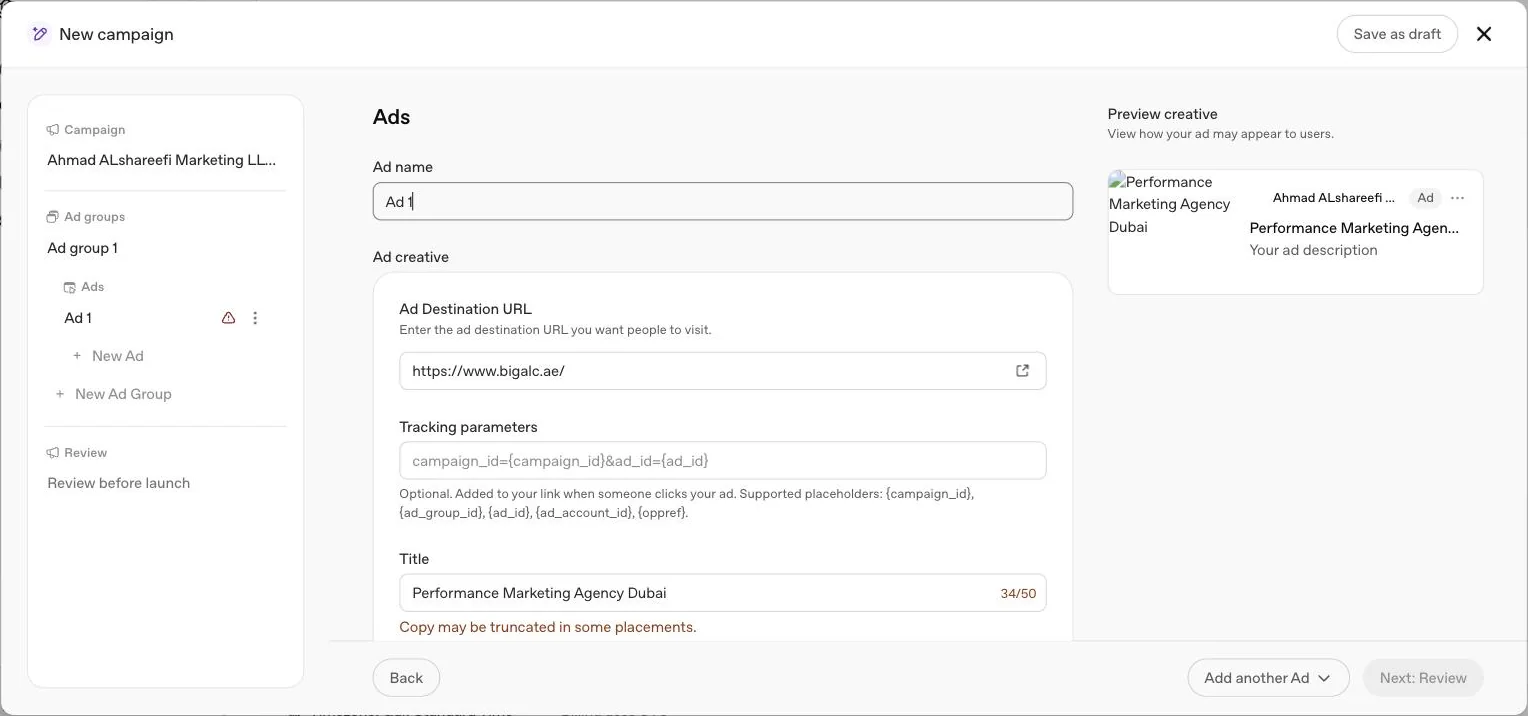
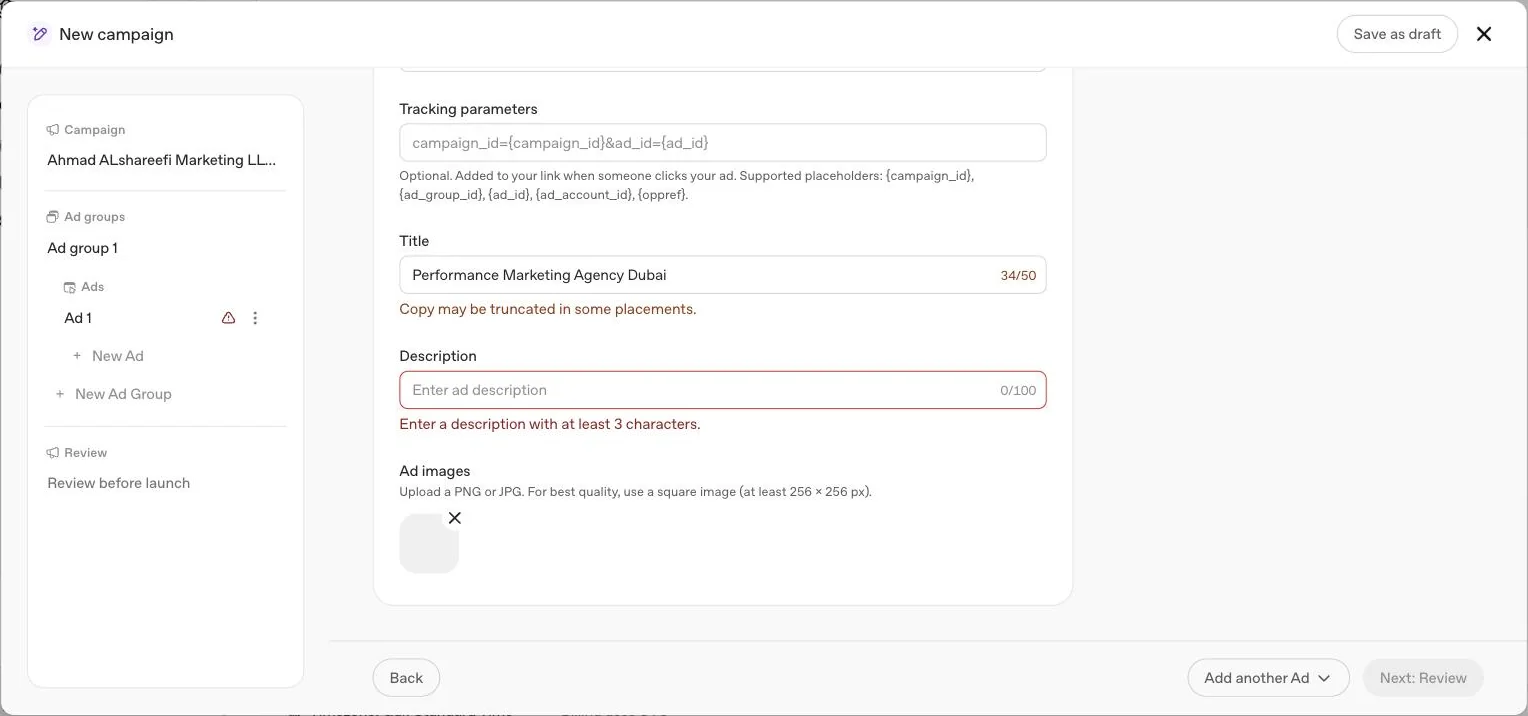
Everything above describes what each level holds. This is what the guided builder actually showed us, field by field, in our own account on 21 September 2026, opened, viewed and discarded, with nothing saved or published. Clicking Create, then Create campaign opens a full screen panel called New campaign, with a left rail listing Campaign, Ad groups, Ads and Review, a Save as draft option, and a close button.
| Ad field, as the builder showed it | Limit |
|---|---|
| Title | 50 character counter, with a truncation warning shown before the limit |
| Description | 100 character counter, minimum 3 characters required |
| Image | Square PNG or JPG, at least 256 by 256 pixels, no larger than 1200 by 1200 pixels per OpenAI's published maximum |
| Tracking parameters | Placeholders {campaign_id}, {ad_group_id}, {ad_id}, {ad_account_id}, {oppref} |
Two things stood out to us. First, the oppref placeholder appearing directly in the tracking parameters helper text confirms, first hand, that the click reference our conversion tracking guide describes is something you can deliberately include in your own tracking URL, not only something OpenAI appends automatically. Second, the image uploader's minimum of 256 by 256 pixels sits alongside OpenAI's separately published maximum of 1200 by 1200 pixels; between those two figures is the working range for an ad image. Until every campaign is submitted, the Publish button stays disabled, and a red banner on our unfinished draft flagged the unfinished ad by name and told us to fix it before moving to review. Closing the builder without publishing offers a choice between cancelling, discarding the draft or saving it, with an on screen reminder that a saved draft keeps your progress but not the campaign's budget.
Two ways to build: guided or bulk upload
Guided campaign creation
Build directly in Ads Manager: click Create, then Create campaign, fill in every field, save, then repeat for ad groups and ads. Best for a first campaign or a small number of them.
Bulk upload
Download the ad schema template from Create, then Upload bulk. Fill campaigns, ad groups and ads tabs, keeping names consistent across tabs, then upload. Best for launching many campaigns at once. See our bulk upload guide for the full column by column checklist.
Bulk upload cannot currently create product feed campaigns; those are always built through the guided flow, covered in our product feed guide. Each ad account holds up to 5,000 campaigns, 5,000 ad groups and 5,000 ads in total, whichever method you use.
Reading performance in Ads Manager
Reporting lives across three views: table view, the default for monitoring campaigns, ad groups and ads directly; chart view, opened from the chart icon next to the three dot menu, for tracking impressions, clicks and spend over a chosen date range; and CSV export, for offline analysis, offering export of the current table view, cumulative values for selected rows only, or daily values.
| Metric | What it shows |
|---|---|
| Impressions | Times an ad was shown |
| Clicks | Times an ad was clicked |
| Spend | Amount billed to date, can lag behind impressions and clicks |
| CTR | Clicks divided by impressions |
| Avg CPC / Avg CPM | Average cost per click or per 1,000 impressions |
| Conversions | Attributed conversion events, click through plus eligible view through, once measurement is set up |
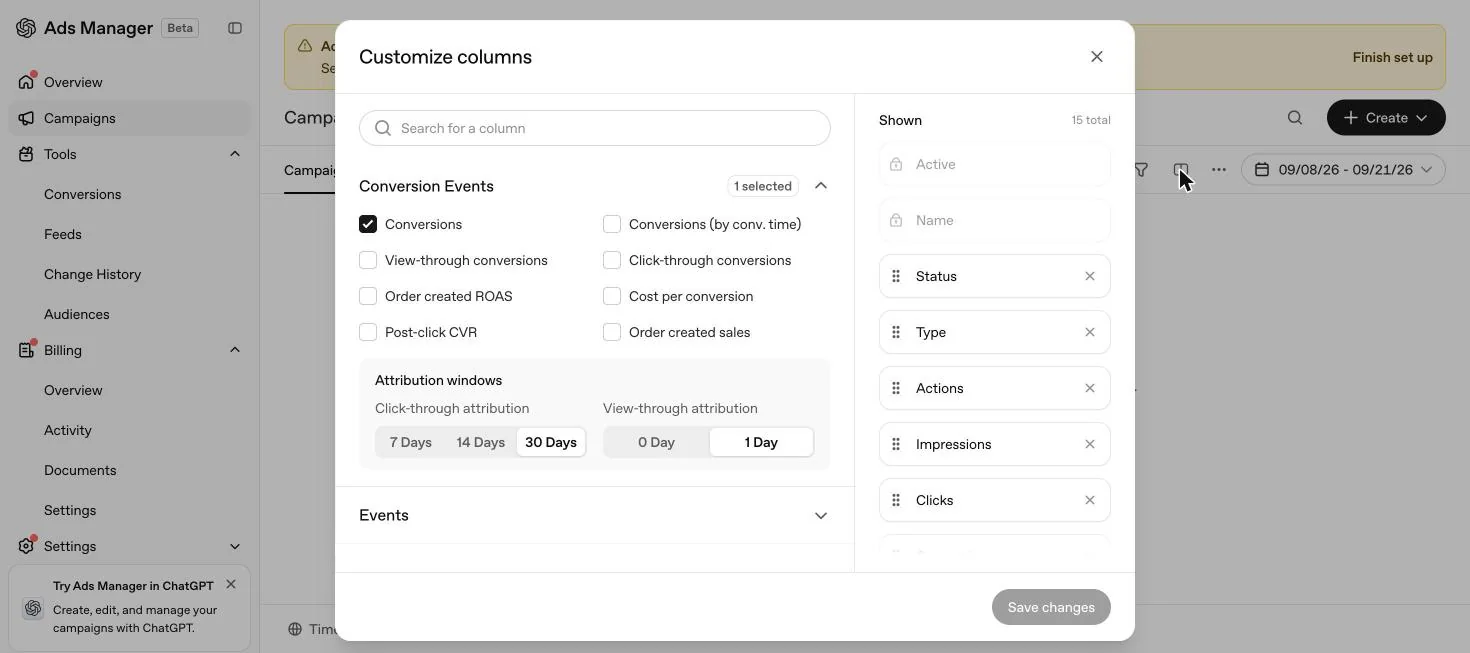
Impressions, clicks and CTR can appear within minutes; spend reporting can take longer, so a displayed spend of zero does not necessarily mean nothing has been charged. The Segment menu adds Device, Country and Platform breakdowns but not conversion event columns; those come from Edit columns instead, where you can also switch to Conversions (by conv. time) and set click through attribution to 7, 14 or 30 days alongside a 1 day or disabled view through window. This is last touch attribution, not multi touch, and changing the window changes reporting only, never optimisation, bidding or billing. Order Created Sales and Order Created ROAS, where shown, are calculated only from attributed order_created events. For product feed campaigns, the Products tab is a reporting view fed by delivery data, not a full inventory list, covered in our product feed guide.
Conversion measurement, briefly
The Conversions section under Tools is where measurement is set up: creating a data source there gives you a Pixel ID and a Conversions API key. OpenAI's own click reference, oppref, is appended to the landing page URL after a click and stored in a first party cookie so a later conversion event can be tied back to it. On our account this screen showed no content at all while setup was unfinished, a reminder that measurement setup, like campaign delivery, waits on account information and billing being complete first. Full attribution and export mechanics are in our reporting guide, and conversion setup itself, including the Pixel, the Conversions API and how UAE businesses without web checkouts should track WhatsApp or phone leads, is in our conversion tracking guide.
Editing after launch
OpenAI gives two editing paths, and which one you use depends on the size of the change.
| Method | Use for | How |
|---|---|---|
| In-line edit | Quick, one off changes: budget, ad copy, pausing a campaign | Hover the object, open the three dot menu, select Edit, change the field, save |
| Bulk edit | Structural changes at scale: context hints, landing pages, copy across many objects | Select the objects, click Export for edit, change the downloaded file, then upload it through Create, Bulk upload |
Two rules matter here. Always start a bulk edit from a fresh Export for edit, since that file carries current IDs and values, and starting from an old file risks overwriting someone else's changes. And when you bulk update an ad group's context hints, OpenAI treats the uploaded list as the complete replacement value, not an addition, so upload the full set you want live, not only the new ones. New ad groups or ads can also be added through the same bulk file by copying the parent ID into the row and leaving the new object's own ID blank.
What cannot be edited, ever
Why a campaign shows Not serving
Hover over any Not serving status in Ads Manager for the specific reason OpenAI gives. The table below groups the causes OpenAI names in its own troubleshooting article.
| Symptom | Likely cause | What to check |
|---|---|---|
| Not serving right after submission | Ad review incomplete, or a landing page or copy policy mismatch | Status tooltip on the Ads tab for the exact reason, then edit and resubmit |
| Zero impressions after 24 hours | Account verification or billing incomplete | Account info and billing profile both fully complete, not just approved |
| Delivery stopped mid week | Daily budget's seven day allowance used early | Today's spend and the current week's total, not just today |
| Delivering, now behind pace | Campaign total budget pacing slowing delivery ahead of schedule | Remaining budget against the end date; a bid strategy change will not override total budget pacing |
| Ads stopped after a payment issue | Failed card charge at the payment threshold | Payment method in Ads Manager; campaigns, ad groups and ads may all show Not serving until resolved |
| Raising the bid did not fix delivery | Relevance, not bid size, is the limiting factor | Context hints, ad variety and landing page match, since a higher bid does not guarantee delivery |
| New account, no delivery outside home country | New self serve international targeting restriction | Verification approved and a spend threshold met in the home country first |
If none of these resolve it, contact [email protected] with the ad account ID, campaign and ad names, the launch date, and a screenshot showing zero delivery.
Common mistakes
- Editing a live campaign's objective instead of building a new one. It cannot be done, and support cannot do it for you either.
- Treating the daily budget as a hard daily cap. It is a seven day average. A campaign can spend double the daily figure on one strong day.
- Writing one ad per ad group. OpenAI's own advice is many distinct variations, not one message.
- Replaying a bulk upload file after a partial failure. Reuploading rows with a blank ad ID after some already succeeded can create duplicate ads.
- Assuming Maximize results targets a cost ceiling. It optimises for volume, not a CPA or CPC target.
- Leaving account info or billing incomplete after approval. Ads will not serve until the account name, logo and full billing profile are done.
- Assuming a synced directory grants Ads access. A shared tenant or SSO group does not by itself grant a role on a specific account.
Two UAE launch scenarios
These are illustrations built from OpenAI's published rules, not real campaigns or results.
Launch checklist
Account
Account name and logo set exactly as they should appear. Billing profile and payment method both complete. At least one admin who works inside your company.
Campaign
Objective matches the goal you actually want to pay for. Budget type chosen deliberately, since campaign total to daily is a one way door. Dates give the campaign enough time to gather data. Countries and platforms match where you can actually serve customers.
Ad group
One clear focus per group. Two to five specific, accurate context hints. Bid strategy chosen on purpose, not left on the default without checking it fits your goal.
Ad
Several distinct ads per group, each with a different angle. Titles and copy inside OpenAI's recommended character ranges. Landing pages tested against OAI-AdsBot and OAI-SearchBot. UTM parameters on every destination URL.
After submission
Check status in Ads Manager. If an ad shows Not serving, hover for the reason, since most issues can be fixed by editing and resubmitting. Allow up to 24 hours, and up to 7 hours of reporting lag, before treating zero impressions as a problem.
What OpenAI has not published
OpenAI states there are no performance benchmarks across advertisers, industries or campaign types, since the platform is still early in scaling. There is no recommended bid amount for Bid Cap on conversion campaigns. There is no published typical turnaround time for account verification or ad review, only that both sit in a rolling queue support cannot expedite. There is no stated cap on how many context hints an ad group can carry, and no published language restriction for ad creative, so whether to run English, Arabic or both is left to the advertiser. Where our guides recommend a number with no published OpenAI figure behind it, such as two to five context hints, it is labelled as our own view.
A short glossary
How this compares to Google Ads and Meta Ads Manager
We manage all three platforms, so this section is our own comparison, not an OpenAI publication; nothing here is a Google or Meta specification, only how the campaign building blocks map across the three at a structural level.
| Building block | Google Ads | Meta Ads Manager | OpenAI Ads Manager |
|---|---|---|---|
| Match signal | Search keywords the user typed | Audience and interest targeting | Conversational context, plus advertiser written context hints |
| Structure | Account, campaign, ad group, ad | Account, campaign, ad set, ad | Account, campaign, ad group, ad |
| Automatic bidding | Several Smart Bidding strategies | Advantage+ automated bidding | One automatic strategy, Maximize results |
| Catalogue ads | Shopping campaigns from a Merchant Center feed | Catalogue sales from a connected catalogue | Product feed campaigns, guided workflow only |
The practical difference for a UAE advertiser is upstream of any setting: Google Ads meets a shopper who has already typed a query, Meta meets someone scrolling based on inferred interest, and ChatGPT ads meet someone mid conversation, already describing a need in their own words, which is why OpenAI's own creative guidance leans so heavily on benefit focused, specific copy over a punchy line built for a feed. See our ChatGPT ads vs Google Ads guide for the fuller comparison, including budgeting differences.
The UAE specifics
Billing runs in AED once the account is set up with United Arab Emirates as the country, with a minimum daily budget of AED 65. The working week for most UAE teams runs Sunday to Thursday, which lines up with OpenAI's Sunday to Saturday budget week, so a Thursday pacing check catches most issues before the weekend. Set the account time zone to Gulf Standard Time at creation, since it cannot be changed afterward, even though the Campaigns screen footer reminds you that billing itself is tracked in UTC. Ads can run in English or Arabic; OpenAI publishes no language restriction, so the decision is yours. If you operate in a regulated sector such as healthcare, finance or real estate, confirm your local regulator's advertising rules before launch, separately from OpenAI's own ads policy screening during account verification. For services on getting an account running, see our account setup service and full management service.
Quick answers
What is the structure of an OpenAI Ads Manager account?
Four levels. One account holds campaigns, each campaign holds ad groups, and each ad group holds ads. Objective and budget live on the campaign, context hints and bid strategy live on the ad group, and creative lives on the ad.
Can I change a campaign's objective after I create it?
No. OpenAI says the objective and billing model are not intended to be changed after creation. If you picked wrong, build a new campaign rather than editing the old one.
How many campaigns can one ad account hold?
OpenAI's bulk upload limits are 5,000 campaigns, 5,000 ad groups and 5,000 ads per ad account.
What is the difference between in-line edits and bulk edits?
In-line edits are quick changes made directly in Ads Manager, such as pausing a campaign or updating one ad's copy. Bulk edits export a schema file, change it, and re-upload it, which OpenAI recommends for structural changes at scale such as updating context hints across many ad groups.
Who should hold the ad account admin role?
At least one person inside your company, because OpenAI requires every advertising account to keep at least one effective admin at all times. Agencies are added as members or viewers, not as the sole admin.
Why is my campaign showing Not serving after I submitted it?
Hover over the status in Ads Manager for the specific reason. OpenAI lists incomplete account verification, incomplete billing, a campaign date that has not started, exhausted budget, and ad or landing page policy issues as common causes.
What is Maximize results and should I use it by default?
It is OpenAI's automatic bid strategy, selected by default for eligible new ad groups, which adjusts bids to get as many clicks or conversions as possible within budget. OpenAI states it does not target a specific CPA, CPC or ROAS, so switch to manual max bid if you need a hard bid ceiling.
What does the Ads Manager navigation actually contain?
Left navigation reads Overview, Campaigns, Tools, Billing and Settings. Tools expands into Conversions, Feeds, Change History and Audiences, based on our own account observed on 21 September 2026.
Can I use ChatGPT itself to manage my ads?
Yes, for eligible business advertisers. OpenAI's ChatGPT Ads Manager lets you begin self serve account setup and work with supported campaigns, ad groups, ads and performance insights from inside ChatGPT, though available actions can vary and remaining billing, payment, tax or verification steps still finish in Ads Manager.
What is a dynamic URL parameter and how does it decide which value wins?
A macro such as {campaign_id} or {ad_group_id} that Ads Manager fills in automatically on the destination URL. Parameters can be set at Ad URL, Ad, Ad Group or Campaign level, and OpenAI's hierarchy gives the most specific level priority: Ad URL beats Ad, which beats Ad Group, which beats Campaign.
How many matched users does a custom audience need before I can target it?
At least 25,000 for inclusion targeting or an ad group bid adjustment, with 100,000 recommended by OpenAI. Audiences below 25,000 can still be used for exclusions. Full detail is in our custom audiences guide.
Does OpenAI publish what makes a good campaign result?
No. OpenAI states plainly that, as an early platform, ChatGPT Ads does not yet have performance benchmarks across advertisers, industries or campaign types, and that results depend on objective, creative, landing page experience, relevance and overall setup.
Does the campaign builder write my ad for me?
It can, if you leave a toggle called Text customisation on. On our own account this defaulted to on, described in the interface as AI automatically generating personalised and translated versions of your headlines and descriptions, which may run without your individual review. Turn it off if you want only the exact words you wrote to appear.
What are the minimum and maximum image sizes for a ChatGPT ad?
The builder we saw asked for a square PNG or JPG of at least 256 by 256 pixels. OpenAI's published creative specification separately caps images at no larger than 1200 by 1200 pixels, so the working range sits between those two figures.
Related
Account setup
The five setup steps in OpenAI Ads Manager, what a UAE business should prepare, what the Beta looks like once access is granted, and why campaigns still don't serve.
Context hints
Context hints replace keywords in ChatGPT ads. What OpenAI says they are, how they differ from keywords and traditional targeting, five patterns and UAE examples.
Bulk upload checklist
The three tab bulk upload schema for OpenAI Ads Manager, every required column, the formatting rules that cause silent failures and how to fix a rejected file.
Custom audiences
How to build a custom audience from a customer list, the 25,000 user minimum for inclusion targeting, exclusion rules and audience bid multipliers, from OpenAI's own article.
Conversion tracking
How OpenAI measures conversions, what the oppref click reference is, why Pixel plus Conversions API beats either alone, and how to handle WhatsApp and phone sales in the UAE.
Reporting and attribution
Every metric in OpenAI Ads Manager, how click and view conversions are counted, the 7, 14 and 30 day windows, reporting lag and how to export daily data.