
The full path from eligibility check to a live campaign: account, verification, billing, measurement, campaign, ad groups, ads and your first two weeks.
On this page
- The short version
- What is actually in Ads Manager Beta once access is granted
- Before you start: check you are eligible
- Step 1: Create your Ads Manager account
- Step 2: Pass verification
- Step 3: Complete account information and billing
- Step 4: Install measurement before you build a campaign
- Step 5: Build your campaign
- Step 6: Build ad groups and write context hints
- Step 7: Write your ads
- Step 8: Submit for review and launch
- Your first two weeks
- Common mistakes that stall a first campaign
- What OpenAI has not published
- A short glossary
- UAE and Gulf specifics
- Quick answers
The short version
Advertising on ChatGPT means creating an account in OpenAI Ads Manager, passing verification, completing billing, installing measurement, then building a campaign made of one objective, one or more ad groups and several ads inside each. Nothing serves until account information and billing are both complete. Nothing is measurable unless you install tracking before, not after, you launch. This guide walks the whole thing in order, with a link to the deeper guide at each step, and includes what we saw first hand inside the campaign builder itself on our own UAE account, field by field, so nothing about the setup screens is a surprise.
- Check eligibility
- Create the ad account
- Verify the business
- Add billing and logo
- Install measurement
- Build the campaign
- Add ad groups and hints
- Write the ads
- Pass review
- Go live and read results
What is actually in Ads Manager Beta once access is granted
OpenAI's own description of its platform is direct: Ads Manager Beta supports the core workflows needed to run campaigns end to end. In its own words, that means you can create and manage campaigns, individually in the guided workflow or at scale with bulk upload for supported campaign types; monitor performance, tracking impressions, clicks and spend across campaigns, ad groups and ads through table views, charts and CSV exports; and manage account settings, covering members, permissions, API keys, billing details and change logs. OpenAI is equally direct that some capabilities are still limited, since the whole product is a beta that will keep evolving, so expect settings, defaults and even navigation labels to shift between when this guide was verified and when you sign up.
Before you start: check you are eligible
OpenAI requires the legal entity that will advertise and be billed to be based in a country on its self service availability list. The United Arab Emirates is on that list, along with Saudi Arabia, Qatar, Bahrain, Kuwait, Oman and most other Gulf and wider markets. Availability is decided by the advertising entity's country, not by where the person setting up the account happens to be sitting, and not by where the ChatGPT login itself was registered. If your entity is not yet listed, you can still create an account and OpenAI will notify you when it becomes available, but you will not gain access before then, and creating the account early does not itself speed that up. See ChatGPT ads in the UAE for the fuller eligibility picture, including how mainland and free zone entities are treated.
Have these ready before you open ads.openai.com:
Step 1: Create your Ads Manager account
Go to ads.openai.com and sign in
An OpenAI account is required. If you do not already have one, you can create it during this sign up flow.
Enter business details
Business name, website, logo and industry.
Enter account details
Country, currency, time zone and any other required fields. OpenAI states these cannot be changed after the account is created, so use the real details for the entity that will be billed.
Get country, currency and legal name right the first time. If any of the three is wrong once the account exists, OpenAI's stated fix is to create a new advertiser account, not edit the existing one. There is a second way into this same setup flow, too: eligible business advertisers can begin it from inside a ChatGPT conversation through ChatGPT Ads Manager, asking ChatGPT to help set up a business advertiser account and reviewing the same core details before confirming, though any remaining billing, payment, tax or verification steps still finish in Ads Manager itself, and this path does not support individual advertisers or an agency creating an account on a client's behalf. The full setup path, including who should hold the account owner role, is in our account setup guide.
If you manage multiple advertisers
Each advertiser needs its own separate account; there is no way to advertise for several unrelated businesses from one account. To add another once you already have one eligible self serve account on card billing, sign in with the same login, open the account menu and use Create account where it is available. OpenAI caps this at 10 accounts belonged to in total, counting both accounts you created and accounts you were invited into, though you can still be invited to further existing accounts past that limit; you simply cannot create a new one yourself. If you run an agency managing several UAE clients, plan early which login holds account creation rights, since that limit is reached faster than it sounds once a handful of client accounts are involved.
Step 2: Pass verification
After business and account details, you answer a short set of questions through a verification provider called Persona. Once complete, the application goes into review, where OpenAI states it considers whether your products or services are eligible under its ads policies. Applications are reviewed in a rolling queue, and OpenAI is explicit that this can take some time and that support cannot expedite it. The person who created the account is emailed once full platform access is ready.
Do not submit a second application while the first is in review. OpenAI states duplicate applications do not speed anything up and can create confusion about which account is correct. If you exited the verification flow before finishing, return to it from Ads Manager with accurate, current documents rather than starting again from scratch. Two things OpenAI is explicit about here matter for how you plan the wait: completing identity or business verification does not always mean the account is ready to run campaigns immediately, since verification and account review are separate steps, so watch the account status and any email or in-product prompts rather than assuming verification alone is the finish line; and there is currently no way to check progress beyond that status, since OpenAI states it cannot expedite account review for anyone.
Step 3: Complete account information and billing
Two more gates sit between an approved account and a serving ad, and both are easy to miss because approval itself feels like the finish line.
| Gate | What it needs | What happens if it is missing |
|---|---|---|
| Account information | Account name and logo, set in Settings, then Account info | OpenAI states ads will not serve without this, because both appear inside the ad unit |
| Billing | A billing profile (business name, address, invoice email) and a payment method | Campaigns cannot deliver until both are complete |
When you add a card, your bank may show a temporary authorisation hold in your card's currency. OpenAI is explicit that this is not a completed charge and releases automatically after verification, though it can stay visible on a statement for up to 8 days, and the expected hold amount is shown on the setup page itself as well as on the Ads Billing page in Ads Manager. Full billing mechanics, including how the postpay payment threshold works, are in our billing guide.
Step 4: Install measurement before you build a campaign
Do this now, not after launch. A Conversions objective campaign needs conversion tracking already set up, with at least one supported standard event available, before you can create it. Even a Views or Clicks campaign is far harder to judge honestly without it.
Create a data source
In Ads Manager, under the Conversions section. This gives you a Pixel ID and a Conversions API key.
Install the OpenAI Pixel
On the pages where the real action happens, such as a lead form or checkout confirmation, not only the homepage.
Add the Conversions API on your server
For the same event, using the same Pixel ID and matching event ID so OpenAI deduplicates rather than double counts.
Add UTM parameters to your destination URLs
So your own analytics can separate ChatGPT ads traffic from organic ChatGPT referrals.
The full method, including the oppref click reference and how to handle WhatsApp or phone leads, is in our conversion tracking guide. For a UAE business that closes leads over WhatsApp or by phone rather than through a web checkout, this step matters more, not less: the Pixel alone only sees what happens in a browser, so a phone close needs its own path into the Conversions API, logged as a conversion event once the sale is actually confirmed, or that spend will look unmeasurable even when it is working.
Step 5: Build your campaign
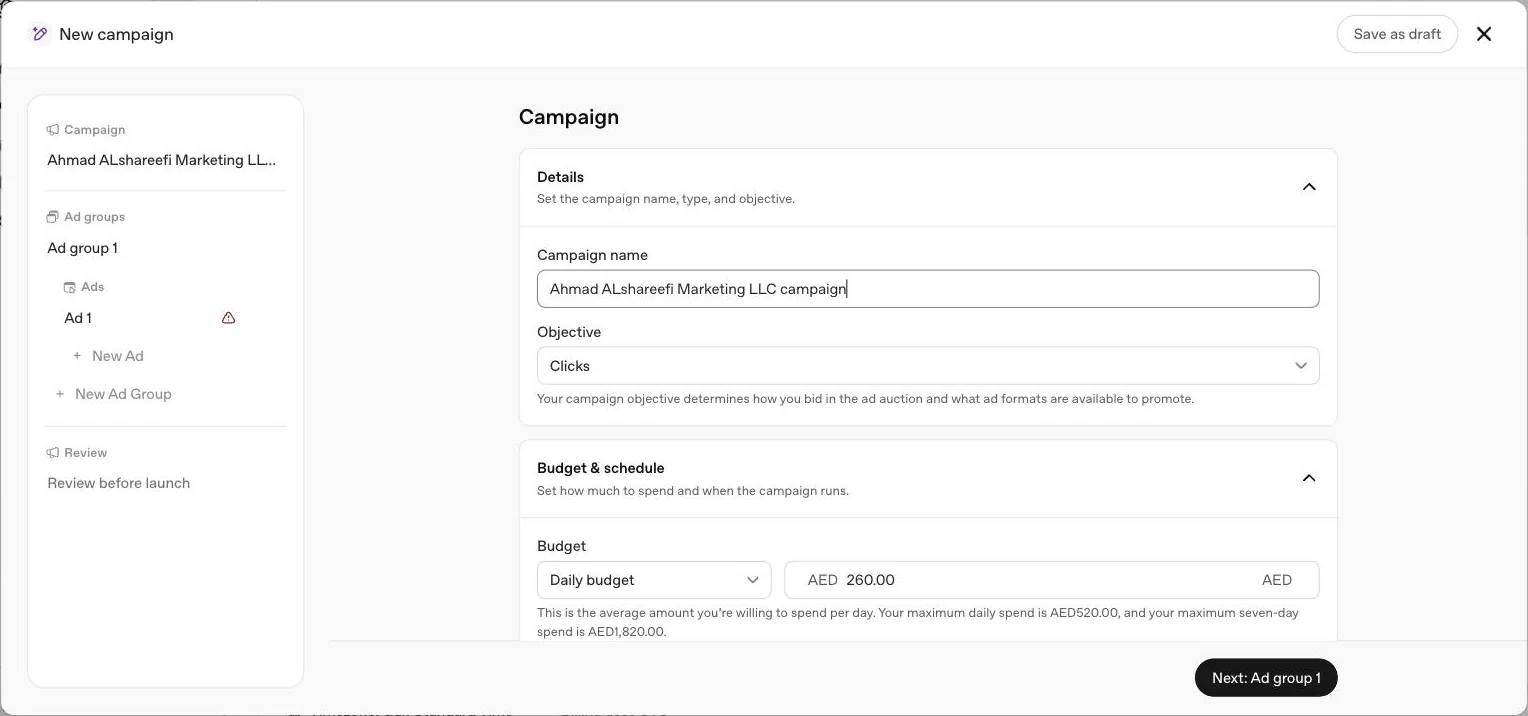
A campaign sets your objective, budget, dates, country and platform targeting. Every campaign follows the same three level structure: campaign, then ad group, then ad.
| Field | What it decides | Can it change later |
|---|---|---|
| Objective (Views, Clicks or Conversions) | How you are billed and what delivery optimises for | No. Create a new campaign instead |
| Budget type (daily or campaign total) | Whether spend is an average over seven days or a ceiling for the whole run | No, though the amount can change |
| Country and dates | Where and when ads are eligible to run | Yes |
Choose Views to buy visibility per 1,000 impressions, Clicks to pay per valid click and drive traffic, or Conversions to optimise toward a supported event with either click billing (oCPC) or impression billing (oCPM). You do not pay per conversion under either. Full pricing mechanics, including the AED 65 UAE minimum daily budget, are in our cost guide.
If your account is brand new, remember that some new self service accounts can initially advertise only in their home country. Selecting other countries in the campaign does not override that restriction, so a UAE launch should target the UAE alone at first.
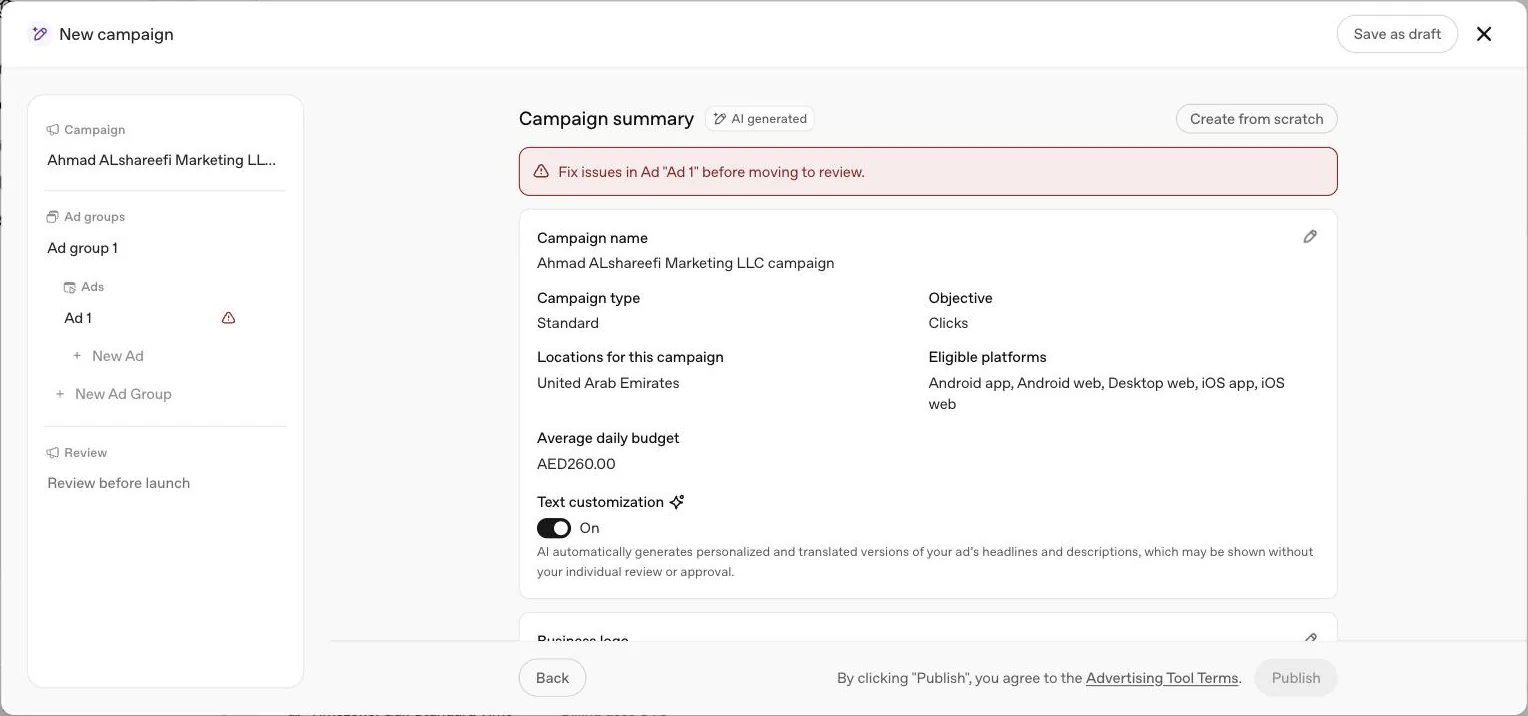
On our own account, the builder opened this step on an AI generated campaign summary already prefilled from the account itself, with a Create from scratch button for anyone who would rather start blank. A Text customisation toggle sat here too, tagged Recommended and on by default, which lets AI generate and translate the ad's headline and description text automatically, and which OpenAI's own interface text says may run without individual review or approval. If you want full control over your own wording, turn this off deliberately rather than leaving the default. The budget field itself wrote out the pacing rule as we typed a number: with an AED 260 daily budget entered, the helper text spelled out a maximum daily spend of AED 520 and a maximum seven day spend of AED 1,820, exactly the twice daily, seven times weekly rule this guide describes above, confirmed inside the interface itself.
Step 6: Build ad groups and write context hints
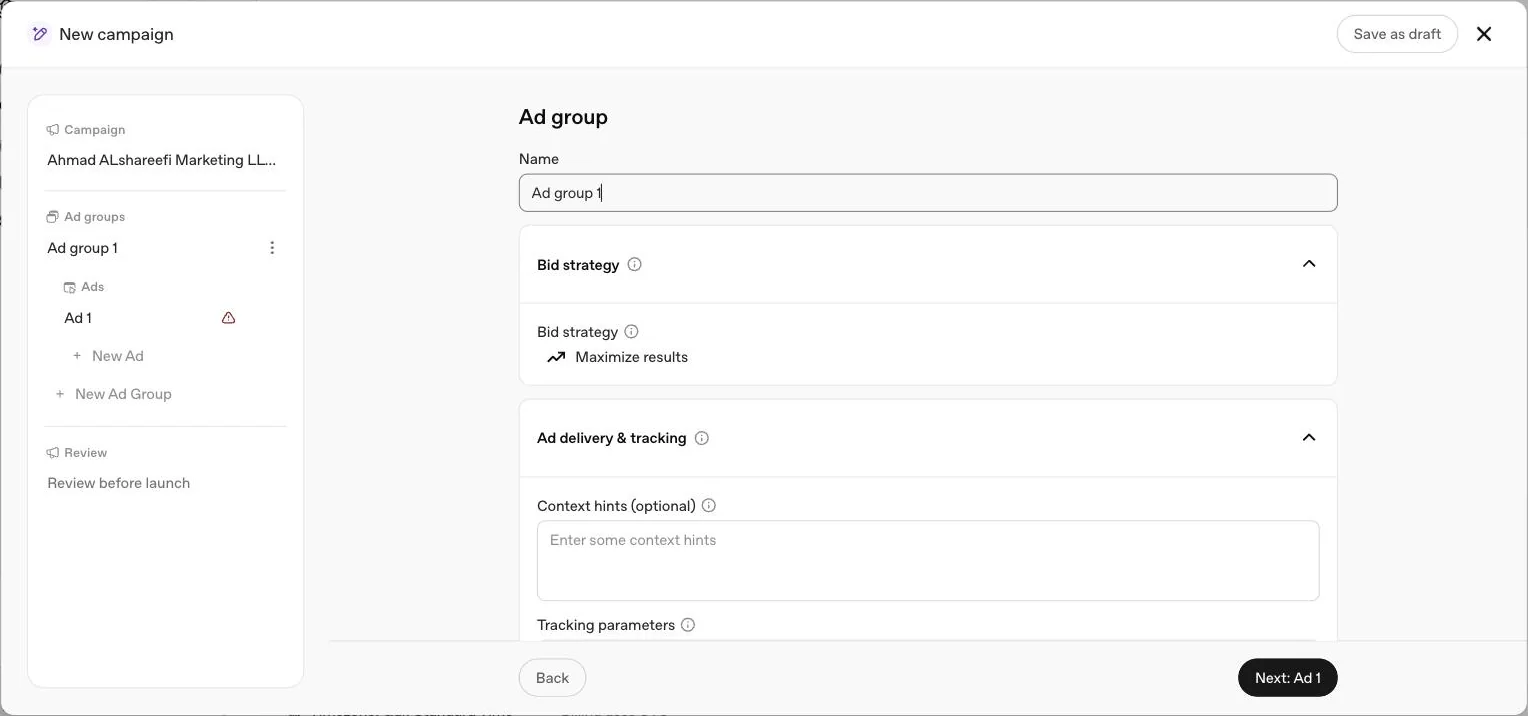
An ad group organises your campaign around one shared product, service or customer need, and carries the bid and the context hints. Use a separate ad group for each meaningfully different need, not one ad group covering everything you sell.
Context hints are natural language phrases that describe what you offer, who it helps and when it is useful. OpenAI's own example: "cushioned everyday running shoes for beginners training for their first 5K" tells the system more than running shoes alone. They are not exact match keywords and do not guarantee delivery. Two to five well written hints per ad group is a reasonable starting point. See our context hints guide for the full method.
Choose a bid strategy at the same step: Manual: Max bid for a fixed ceiling, or Maximize Results, which is selected by default for eligible new ad groups and adjusts bids automatically toward your goal without a guaranteed cost outcome. In our own account, the ad group step itself was short: a name field, a Bid strategy field showing Maximize results, and an Ad delivery & tracking section holding an optional context hints box, its placeholder simply inviting you to enter some context hints, alongside a tracking parameters field.
Step 7: Write your ads
Each ad has six parts: advertiser name and favicon, drawn from your account settings, plus a title, copy, landing page and image you write per ad. OpenAI's guidance is to build for coverage, not one perfect message: several distinct title and copy variations per offering, each taking a different angle, so its system can find more moments where your ad is genuinely relevant.
| Item | Requirement |
|---|---|
| Title | Spells out the value clearly, 16 to 24 characters recommended, 50 maximum |
| Copy | Adds something the title did not say, 32 to 48 characters recommended, 100 maximum |
| Image | PNG or JPG, square, at least 256 by 256 pixels per the builder, no larger than 1200 by 1200 pixels per OpenAI's published specification, publicly accessible |
| Landing page | Valid, reachable, and does not block OAI-AdsBot or OAI-SearchBot |
Send each ad to the page that answers that specific need, not a general homepage. Worked examples across UAE industries are in our ad examples guide.
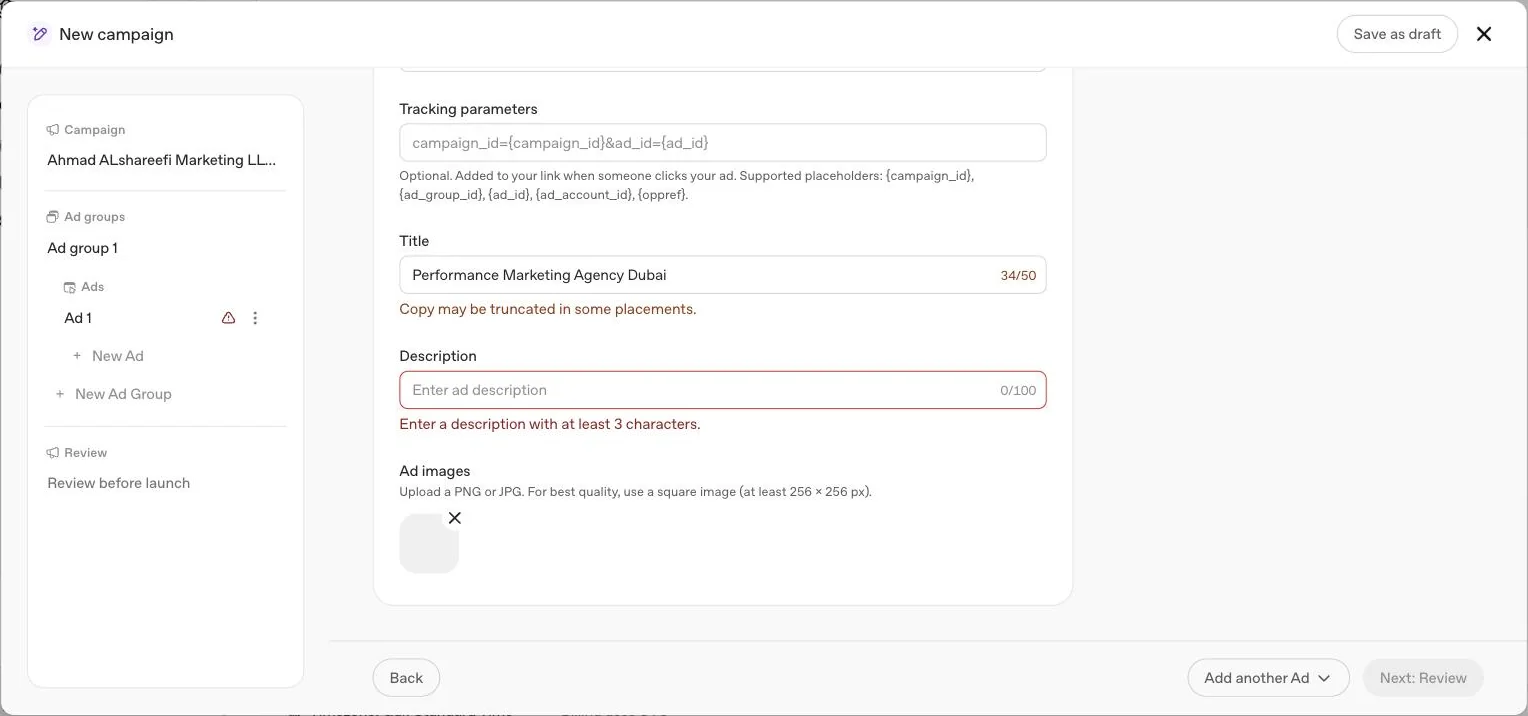
The ad step itself, as our account showed it, carried an Ad Destination URL field; a tracking parameters field with placeholder text campaign_id={campaign_id}&ad_id={ad_id} and a note confirming {campaign_id}, {ad_group_id}, {ad_id}, {ad_account_id} and {oppref} as supported placeholders; a Title field with a live counter capped at 50 characters and a warning that copy may be truncated in some placements; a Description field capped at 100 characters, requiring at least 3; and a live Preview creative panel showing the image, business name, an Ad label, the title and the description assembled together, so you can see the finished unit before submitting rather than judging separate fields in isolation.
Step 8: Submit for review and launch
Once campaigns, ad groups and ads are built, set the campaign status to Active. Ads then go through review before they can serve. In the Ads tab, a delivering ad shows a Serving status; hover over Not serving for the reason, most often a policy mismatch or a landing page blocking OpenAI's crawlers. Until every issue is resolved, the builder itself will not let you finish: on our own draft, a red banner flagged the unfinished ad by name and told us to fix it before moving to review, and the Publish button stayed disabled throughout.
Common rejection reasons, per OpenAI's own troubleshooting guidance
We have not yet run live ads on our own account to report a first hand rejection, so this table reflects what OpenAI's own troubleshooting article names, not our own campaign history.
| Reason OpenAI names | What it means |
|---|---|
| Ad copy or landing page does not align with OpenAI's ads policies | The Status tooltip on the Ads tab gives the specific reason; edit the ad and resubmit, or request another review if you believe it was rejected in error |
| Landing page blocks OpenAI's crawlers | robots.txt, a firewall or bot mitigation rule, or a CAPTCHA or login wall can all silently block OAI-AdsBot |
| Image fails validation | Not square, larger than 1200 by 1200 pixels, or not publicly accessible without sign in |
| Account verification or billing incomplete | The ad itself can be perfectly built and still not serve if account information or billing is unfinished |
After launch, OpenAI's own guidance is to allow at least 24 hours before treating a lack of delivery as a fault, since reporting itself can lag actual delivery by up to 7 hours on top of that. Impressions, clicks and click through rate typically appear within minutes; spend can take longer, so a spend of zero does not mean nothing has been charged.
Your first two weeks
Days 1 to 2: confirm delivery
Check the campaign shows Serving status and impressions are accumulating. If not, work through our ads not showing checklist before changing anything else.
Days 3 to 7: confirm tracking
Click through your own ad and confirm the oppref parameter survives to your confirmation page, and that a real conversion event fires and appears attached to the right campaign.
End of week one: read the weekly total, not the daily one
A daily budget is an average over seven days, so judge the seven day spend against the AED figure you planned, not any single day.
Week two: add ad variations before you touch the bid
If delivery or relevance looks thin, more distinct ads per offering usually moves the needle before a bid change does.
This is our own sequencing, not an OpenAI timetable, built on the platform rules above: a seven day budget cycle needs a full week before cost per click means anything, and reporting itself can lag delivery, so nothing in week one should be judged from a same day dashboard.
Common mistakes that stall a first campaign
What OpenAI has not published
A typical turnaround time for account verification or ad review, beyond both sitting in a rolling queue that support cannot expedite. A performance benchmark for a first campaign, since OpenAI states plainly that ChatGPT Ads does not yet have performance benchmarks across advertisers, industries or campaign types. Whether Text customisation, the AI headline and description toggle we saw on by default in the builder, behaves differently by market or language. And no confirmation of exactly how long an account stays restricted to its home country before wider Gulf targeting opens up, beyond identity verification being approved and a spend threshold being met there first.
A short glossary
UAE and Gulf specifics
Set your account country to United Arab Emirates, currency to AED and time zone to Gulf Standard Time at step one, since all three lock permanently. The minimum daily budget for a dirham account is AED 65, though a budget that can actually be judged usually needs to run well above that floor for several weeks; our own account's builder defaulted its example budget field to AED 260 a day, with the pacing helper text confirming a maximum daily spend of AED 520 and a maximum seven day spend of AED 1,820 at that figure. Write separate ads for Arabic and English rather than one bilingual unit, since each ad carries a single title and copy and OpenAI says ad language selection considers the user's location, language and conversation; if you turn on the builder's Text customisation toggle, be aware it can generate and show translated versions of your headlines and descriptions itself, without your individual review, which is worth a deliberate decision rather than leaving on the default. If a regulated sector applies to you, such as healthcare, financial services or real estate, expect OpenAI's own eligibility review to look closely at your application, and separately confirm with your UAE regulator what its own advertising rules require. If you would rather hand this whole walkthrough to someone else, see our account setup service and campaign management service.
Quick answers
How do I start advertising on ChatGPT?
Sign in at ads.openai.com with an OpenAI account, complete business and account verification, finish billing and account information, then build a campaign, ad group and ads before submitting for review.
How long does it take to get a ChatGPT ad live?
OpenAI does not publish a timeline. Verification is reviewed in a rolling queue and can take some time, and OpenAI says to allow at least 24 hours after launch, plus up to 7 hours of reporting lag, before judging delivery.
Do I need a website to advertise on ChatGPT?
Yes. Every ad needs a valid, reachable landing page that does not block OpenAI's crawlers, OAI-AdsBot and OAI-SearchBot, and business details including your website are required during account setup.
What is the minimum budget to advertise on ChatGPT?
It depends on your account's billing currency. For AED it is 65 a day. This is a floor for one campaign, not a benchmark for a budget that will produce a judgable test.
Can I advertise on ChatGPT without an agency?
Yes. Ads Manager is self service, and a UAE business can complete every step in this guide itself. An agency's value is in structure, tracking and honest judgement of the test, not in access.
What do I need ready before I start the account setup?
Your legal business name as it appears on your trade licence, your website, logo and industry, a company card, a billing address, and one person inside the business to be account owner.
Can I run ads before conversion tracking is installed?
You can, but we would not recommend it. A Views or Clicks campaign will deliver without it, but a Conversions campaign requires at least one supported standard conversion event, and any campaign is harder to judge honestly without measurement in place first.
What happens if I manage several client accounts?
Each advertiser needs its own separate account. One OpenAI login can access several, but self serve account creation stops once you belong to 10 accounts in total, counting ones you created and ones you were invited to.
Does Ads Manager write my ad copy for me?
It can. A Text customisation toggle, on by default in the campaign builder, lets AI generate and translate your headlines and descriptions, which OpenAI states may run without your individual review unless you turn it off.
Why was my ad rejected?
OpenAI's troubleshooting guidance points to a handful of common causes: ad copy or a landing page that does not align with its ads policies, a landing page blocking OAI-AdsBot, an image that fails validation, or account verification and billing still being incomplete. The exact reason shows in the status tooltip on the Ads tab.
What does the Ads Manager builder actually let me set on the ad itself?
A destination URL, tracking parameters with placeholders for the campaign, ad group, ad, ad account and the oppref click reference, a title capped at 50 characters, a description capped at 100 characters with a 3 character minimum, and an image, previewed live as you build it.
Related
Account setup
The five setup steps in OpenAI Ads Manager, what a UAE business should prepare, what the Beta looks like once access is granted, and why campaigns still don't serve.
ChatGPT ads in the UAE
The UAE is on OpenAI's self service list. Who qualifies, the AED 65 daily minimum, how billing and account setup work and a four week test plan.
Context hints
Context hints replace keywords in ChatGPT ads. What OpenAI says they are, how they differ from keywords and traditional targeting, five patterns and UAE examples.
Conversion tracking
How OpenAI measures conversions, what the oppref click reference is, why Pixel plus Conversions API beats either alone, and how to handle WhatsApp and phone sales in the UAE.
ChatGPT ads cost in AED
OpenAI publishes no rate card. Here is what it does publish: billing by objective, a suggested starting CPC bid, the AED 65 daily minimum and how budgets really pace.
Ads not showing? Fixes
Zero impressions, rejected ads, failed uploads, blocked bots and delivery that drops for no reason. Every check OpenAI lists, in the order that solves most accounts fastest.
Ads Manager complete guide
Every level of OpenAI Ads Manager explained: account, campaign, ad group and ad, what each screen shows, what cannot be edited later, and a launch checklist.